
Engagement details overview
Open the worker’s profile and navigate to the Engagement Details tab in the lower section of the screen.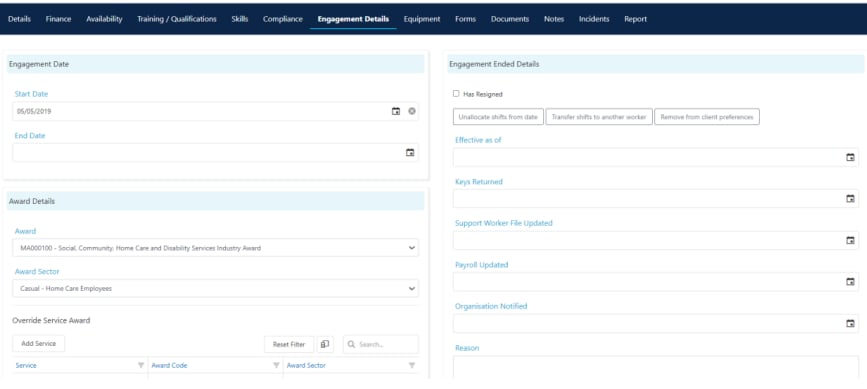
Award details
Select the award the worker is on from the Award Details section. This links the worker to the correct pay conditions for your organisation.Pay rate overrides
Use the Override Service Pay Level section (under Award Details) to set service-specific pay rate overrides. This is useful when a worker is typically on one pay rate level but moves to a different level for specific services.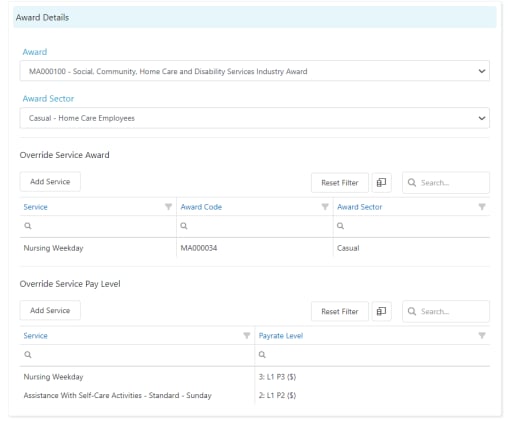
- Click Add Service in the Override Service Pay Level section
- Select the service
- Choose the pay rate level that applies when the worker delivers that service
Running into issues?
See Worker management troubleshooting for common errors and fixes.Related articles
Pay rates
Configure bank details and pay rate levels
Offboarding a worker
Steps to offboard a worker from Visualcare
Creating a worker profile
Set up a new worker in Visualcare