> ## Documentation Index
> Fetch the complete documentation index at: https://help.visualcare.com.au/llms.txt
> Use this file to discover all available pages before exploring further.
# Adding skills
> How to add and manage skills on a worker profile in Visualcare
Worker skills help you match the right worker to the right shift. Skills assigned to a worker profile are used when searching for workers during rostering, making it easier to find someone with the right capabilities.
## What you'll need
* A worker profile open in VCore
* Skills configured in **Maintenance** → **Workers** → **Skills** (see [Compliance workflows and settings](/worker-management/compliance-workflows-and-settings) for details on managing maintenance lists)
## Instructions
Navigate to the worker's profile and open the **Skills** tab in the lower section of the screen.
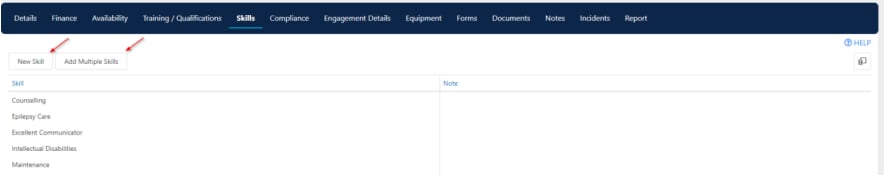 Click **New Skill** to add a skill one at a time. Select the skill from the list and save.
To edit an existing skill, double-click on the item.
Click **Add Multiple Skills** to assign several skills in one go. Select the skills you need and confirm.
Keep worker skills up to date so that rostering searches return accurate results. When a worker completes new training or gains a new qualification, add the corresponding skill to their profile.
## Running into issues?
See [Worker management troubleshooting](/troubleshooting/general) for common errors and fixes.
## Related articles
Track worker training and qualifications
Set up a new worker in Visualcare
Configure skills and other maintenance lists
Click **New Skill** to add a skill one at a time. Select the skill from the list and save.
To edit an existing skill, double-click on the item.
Click **Add Multiple Skills** to assign several skills in one go. Select the skills you need and confirm.
Keep worker skills up to date so that rostering searches return accurate results. When a worker completes new training or gains a new qualification, add the corresponding skill to their profile.
## Running into issues?
See [Worker management troubleshooting](/troubleshooting/general) for common errors and fixes.
## Related articles
Track worker training and qualifications
Set up a new worker in Visualcare
Configure skills and other maintenance lists