> ## Documentation Index
> Fetch the complete documentation index at: https://help.visualcare.com.au/llms.txt
> Use this file to discover all available pages before exploring further.
# Vworker: Progress notes
> How workers add notes, photos, view client information and manage shift documentation in the Vworker app
During a shift, workers can add progress notes, view client information, manage expenses, complete checklists and access documents through the Vworker app. All notes and records flow through to VCore for the office to review.
## Adding notes and photos
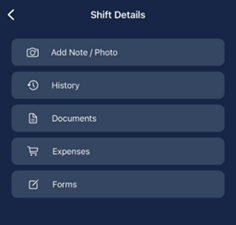
Workers can add progress notes during a shift by selecting **Add Note / Photo** from the **More** menu within the shift. These notes provide a formal record of the shift and are time-stamped, date-stamped and name-stamped. They flow through to the electronic client file in VCore.
Photos can be added where applicable, for example to document wound care or a client performing an activity.
 Workers can add notes after the shift has been completed by going back into the shift and clicking **Add Notes**. Notes can be added until midnight on the day of the shift.
Workers can also access past shifts through the **Timesheets** section in the Vworker app. Tap on a completed shift to open the client profile and add notes or photos from there.
## Viewing client notes
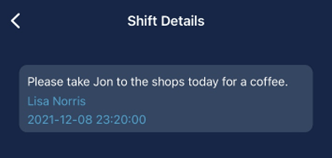
Workers can view notes relating to the client by tapping **Notes** at the bottom of the shift screen. These notes contain specific details about the shift or the client.
Workers can add notes after the shift has been completed by going back into the shift and clicking **Add Notes**. Notes can be added until midnight on the day of the shift.
Workers can also access past shifts through the **Timesheets** section in the Vworker app. Tap on a completed shift to open the client profile and add notes or photos from there.
## Viewing client notes
Workers can view notes relating to the client by tapping **Notes** at the bottom of the shift screen. These notes contain specific details about the shift or the client.

 ## Viewing shift history
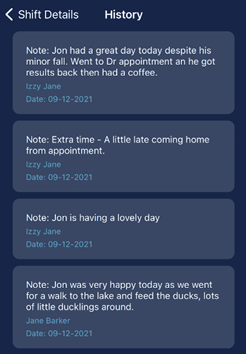
Tap **History** from the **More** menu to review historical notes about the client.
## Viewing shift history
Tap **History** from the **More** menu to review historical notes about the client.
 ## Additional shift features
Workers can access these additional features from the **More** menu within a shift:
## Additional shift features
Workers can access these additional features from the **More** menu within a shift:
 | Feature | Description |
| -------------------- | ------------------------------------------------------------------------- |
| **Add Note / Photo** | Add timestamped progress notes and photos to the client's electronic file |
| **History** | View historical notes and records for the client |
| **Documents** | Access documents uploaded to the client's profile |
| **Expenses** | Add expense items related to the client service, including receipts |
| **Forms** | Create and complete forms using templates set up by the office |
## Running into issues?
See [Timesheet troubleshooting](/troubleshooting/timesheet-issues) for common errors and fixes.
## Related articles
How workers start and complete shifts through the app
Overview of all features available in the Vworker app menu
How workers view and manage location roster shifts in the app
| Feature | Description |
| -------------------- | ------------------------------------------------------------------------- |
| **Add Note / Photo** | Add timestamped progress notes and photos to the client's electronic file |
| **History** | View historical notes and records for the client |
| **Documents** | Access documents uploaded to the client's profile |
| **Expenses** | Add expense items related to the client service, including receipts |
| **Forms** | Create and complete forms using templates set up by the office |
## Running into issues?
See [Timesheet troubleshooting](/troubleshooting/timesheet-issues) for common errors and fixes.
## Related articles
How workers start and complete shifts through the app
Overview of all features available in the Vworker app menu
How workers view and manage location roster shifts in the app