> ## Documentation Index
> Fetch the complete documentation index at: https://help.visualcare.com.au/llms.txt
> Use this file to discover all available pages before exploring further.
# Roster time settings
> Configure default settings for shift timing, late shift thresholds, and related roster behaviours
Travel time settings control how Visualcare handles shift timing, late shift thresholds and related roster behaviours that affect timesheets. These settings are configured in the rostering section of settings.
## Accessing travel time settings
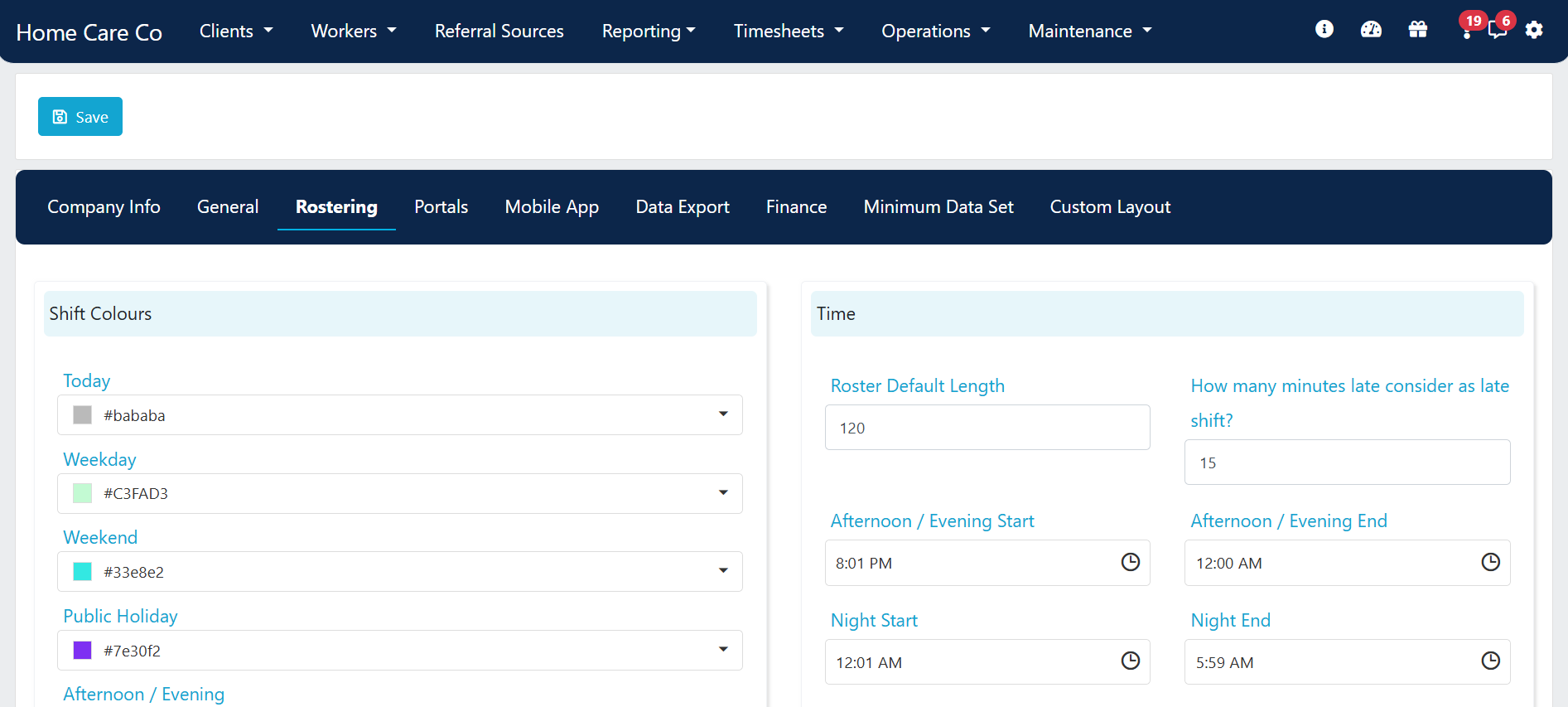
Go to **Settings** → **Rostering** to view and update settings related to shift timing and travel.
 ## Time settings
The time settings section controls how shift times behave in rosters and flow through to timesheets.
| Setting | Description |
| ------------------------------------------------ | ------------------------------------------------------------------------------------------------------------------------------------------------------------------------------------------------------------------ |
| **Roster Default Length** | Sets the default shift end time based on start time plus this value (in minutes) |
| **How many minutes late consider as late shift** | Controls the late KPI on the home page. Once this timeframe passes without the shift being started, the shift counts as late |
| **Shift Start / End Times** | Defines the boundaries for afternoon and night shifts. These values are also used by the rate link functionality in **Maintenance** → **Services** to automatically update the service applied to a rostered shift |
| **Lock Roster on and Before** | Prevents changes to rosters or new shifts before a specific date. Useful at the end of financial year after all claiming, billing and payroll is complete |
## Auto split shift
Ticking the **Auto Split Shift** box makes the system automatically split overnight shifts at midnight and apply the correct service code for the following day.
This only applies for shifts rostered overnight from a weekday to a weekend or public holiday (and vice versa). For example, a Friday night to Saturday shift, or a Saturday to Sunday shift.
## Allow editing started shifts
The **Allow shift(s) to be edited when it has already been started by workers** setting controls whether you can change a shift on a client or location roster once a worker has started it.
If the shift has been completed by the worker, you need to edit the details at the timesheet level rather than on the roster.
## Running into issues?
See [Timesheet troubleshooting](/troubleshooting/timesheet-issues) for common errors and fixes.
## Related articles
Overview of how Visualcare captures transport and between-visit kilometres
Configure payroll cycles, kilometre rates and export codes
Confirm travel time and kilometre entries for payroll processing
## Time settings
The time settings section controls how shift times behave in rosters and flow through to timesheets.
| Setting | Description |
| ------------------------------------------------ | ------------------------------------------------------------------------------------------------------------------------------------------------------------------------------------------------------------------ |
| **Roster Default Length** | Sets the default shift end time based on start time plus this value (in minutes) |
| **How many minutes late consider as late shift** | Controls the late KPI on the home page. Once this timeframe passes without the shift being started, the shift counts as late |
| **Shift Start / End Times** | Defines the boundaries for afternoon and night shifts. These values are also used by the rate link functionality in **Maintenance** → **Services** to automatically update the service applied to a rostered shift |
| **Lock Roster on and Before** | Prevents changes to rosters or new shifts before a specific date. Useful at the end of financial year after all claiming, billing and payroll is complete |
## Auto split shift
Ticking the **Auto Split Shift** box makes the system automatically split overnight shifts at midnight and apply the correct service code for the following day.
This only applies for shifts rostered overnight from a weekday to a weekend or public holiday (and vice versa). For example, a Friday night to Saturday shift, or a Saturday to Sunday shift.
## Allow editing started shifts
The **Allow shift(s) to be edited when it has already been started by workers** setting controls whether you can change a shift on a client or location roster once a worker has started it.
If the shift has been completed by the worker, you need to edit the details at the timesheet level rather than on the roster.
## Running into issues?
See [Timesheet troubleshooting](/troubleshooting/timesheet-issues) for common errors and fixes.
## Related articles
Overview of how Visualcare captures transport and between-visit kilometres
Configure payroll cycles, kilometre rates and export codes
Confirm travel time and kilometre entries for payroll processing