> ## Documentation Index
> Fetch the complete documentation index at: https://help.visualcare.com.au/llms.txt
> Use this file to discover all available pages before exploring further.
# Notes report
> Run reports on client and worker notes in Visualcare
The notes report lets you pull a report of notes across your organisation, filtered by note type. Access the report from **Reports** → **Notes Report**.
## Running a notes report
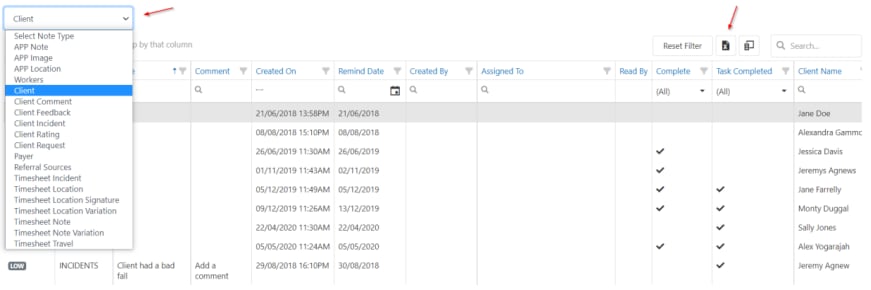
Use the drop-down list on the left-hand side to select the type of note. Once loaded, you can sort, filter and export the results to Excel.
 ## Running into issues?
See [General troubleshooting](/troubleshooting/general) for common errors and fixes.
## Related articles
Record and manage client progress notes
Manage notes and tasks on client profiles
Run reports on client data
## Running into issues?
See [General troubleshooting](/troubleshooting/general) for common errors and fixes.
## Related articles
Record and manage client progress notes
Manage notes and tasks on client profiles
Run reports on client data