> ## Documentation Index
> Fetch the complete documentation index at: https://help.visualcare.com.au/llms.txt
> Use this file to discover all available pages before exploring further.
# Integration settings: SAH and NDIS
> Configure your organisation's funding types, government IDs, accounting software, and Support at Home transition settings
This article covers the key configuration settings that connect Visualcare to government funding schemes (NDIS, Support at Home, CHSP) and your accounting software. It also covers the Support at Home (SAH) transition tools, including the migration dashboard and CHSP migration wizard.
## Custom layout settings
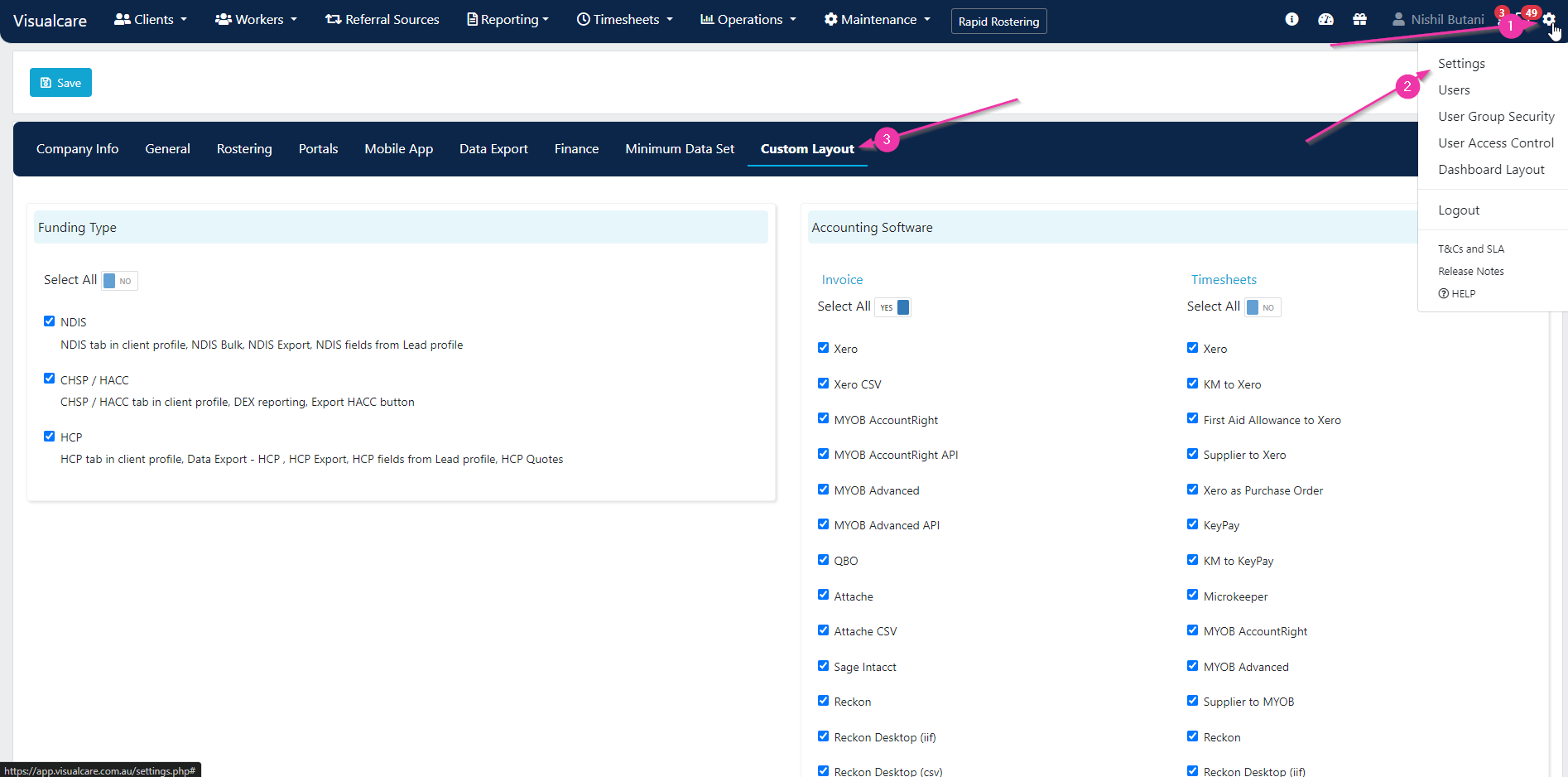
Custom layout settings control which funding types and features are visible across VCore for all users. Navigate to **Settings** → **Custom Layout**.
 ### Funding types
Select which funding types you want to display in VCore:
* **NDIS**
* **CHSP/HACC**
* **HCP** (now transitioning to Support at Home)
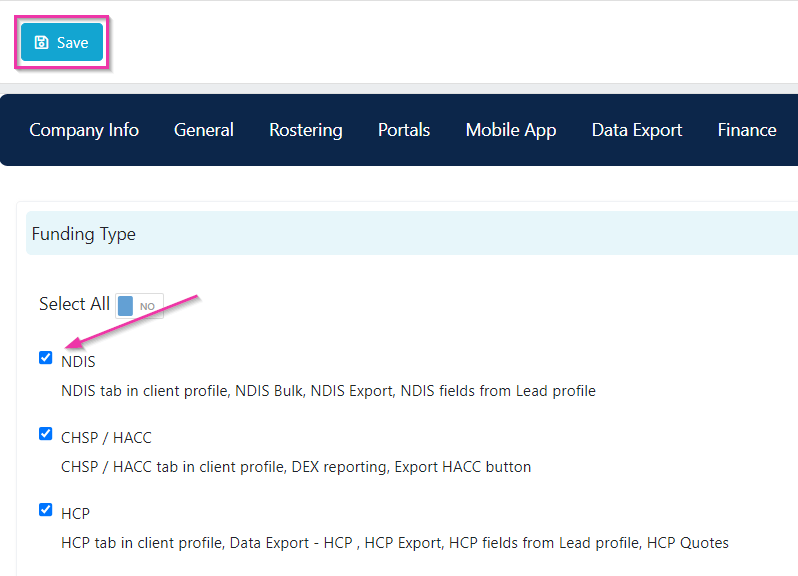
Click **Save** after making your selections. Fields and functionality throughout VCore will show or hide based on these selections.
### Funding types
Select which funding types you want to display in VCore:
* **NDIS**
* **CHSP/HACC**
* **HCP** (now transitioning to Support at Home)
Click **Save** after making your selections. Fields and functionality throughout VCore will show or hide based on these selections.
 ### Accounting software
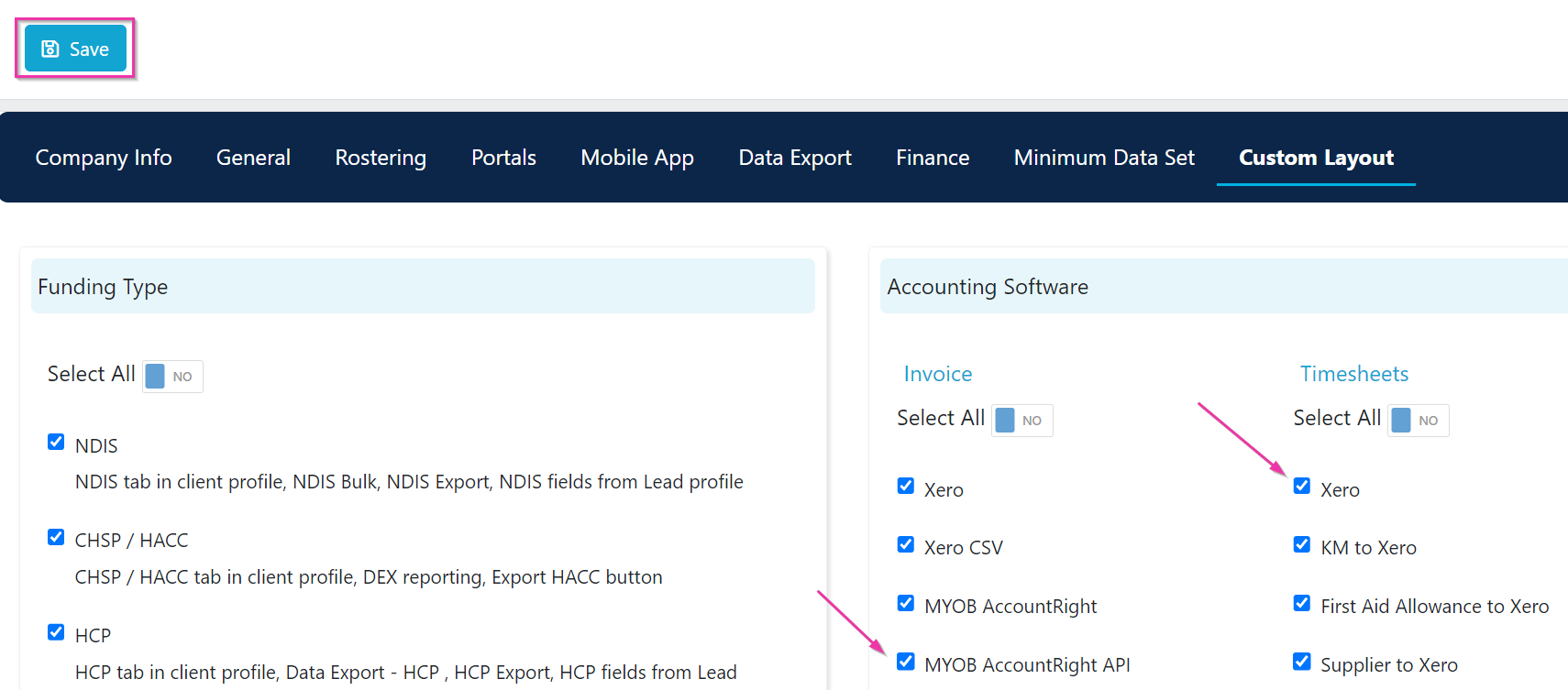
Select your accounting software from the drop-down. This determines what appears on the data export page when exporting invoices and timesheets.
### Accounting software
Select your accounting software from the drop-down. This determines what appears on the data export page when exporting invoices and timesheets.
 ## Company information and government IDs
Your organisation's government identifiers are set under **Settings** → **Company Info**. These link directly to the claiming functionality for different funding sources.
## Company information and government IDs
Your organisation's government identifiers are set under **Settings** → **Company Info**. These link directly to the claiming functionality for different funding sources.
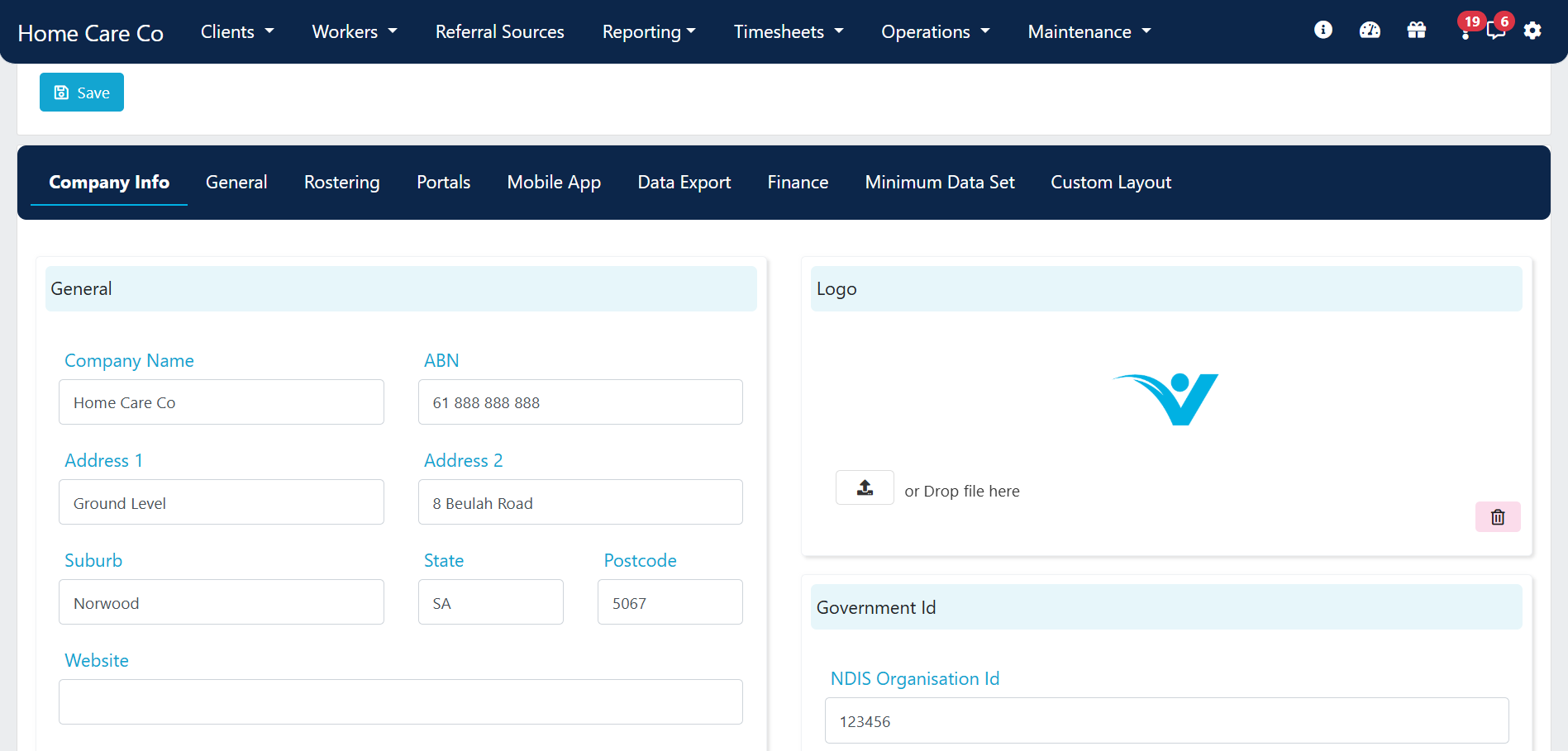 Under this section, add or edit your company information including:
* Business address
* ABN
* Phone number
* Company logo
* Time zone
Click **Save** after making changes.
### Government ID fields
Under this section, add or edit your company information including:
* Business address
* ABN
* Phone number
* Company logo
* Time zone
Click **Save** after making changes.
### Government ID fields
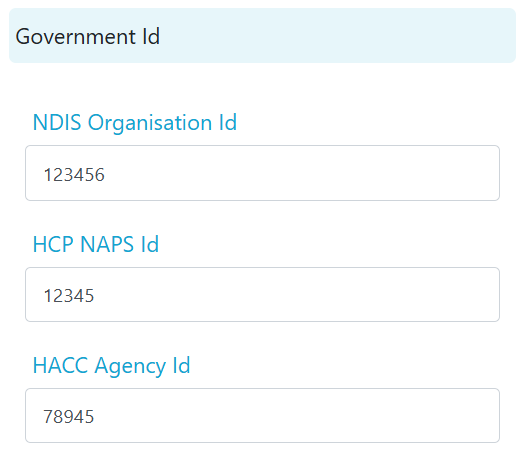 | Field | Description |
| ------------------------ | -------------------------------------------------------------------------------------------------------------------------------------------------------------------------------------------------------------------------------------------------------------------- |
| **NDIS Organisation ID** | Your NDIS registration number. This is included in the NDIS claim file |
| **HCP NAPS ID** | Your organisation's National Approved Provider System (NAPS) identification number. If you have more than one NAPS ID, enter additional IDs under **Maintenance** → **Areas** and ensure the correct area is selected on each client profile |
| **HACC Agency ID** | Required for HACC/SCP services to export correctly. If you have multiple agency IDs, set them up under **Maintenance** → **Areas**. Ensure the correct time zone is also set, as HACC categories and fields differ between VIC (Melbourne) and WA (Perth) time zones |
## General settings related to operations
Several settings in **Settings** → **General** affect operational features across VCore.
### Task email notifications
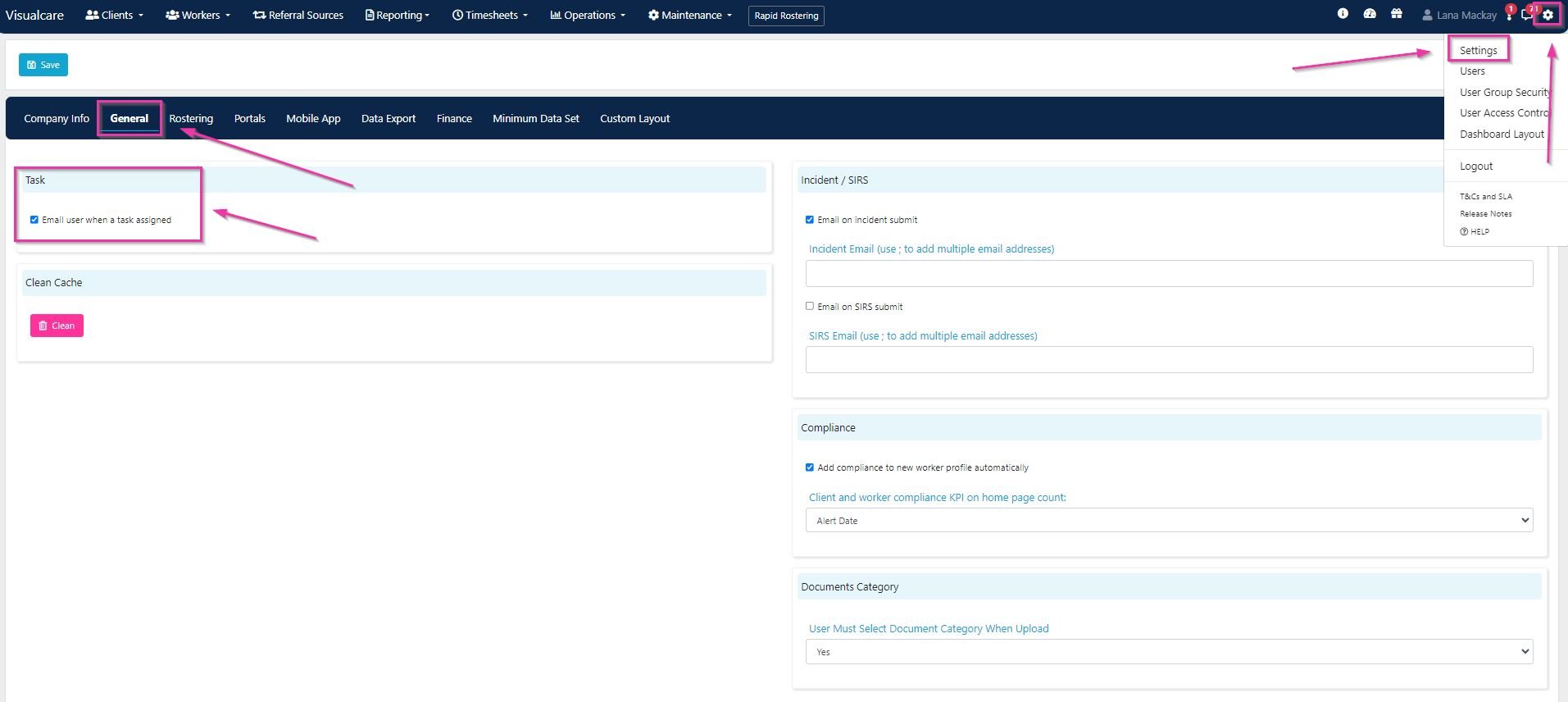
To have all VCore users receive an email when a task is assigned to them, tick **Email user when a task assigned** and click **Save**.
| Field | Description |
| ------------------------ | -------------------------------------------------------------------------------------------------------------------------------------------------------------------------------------------------------------------------------------------------------------------- |
| **NDIS Organisation ID** | Your NDIS registration number. This is included in the NDIS claim file |
| **HCP NAPS ID** | Your organisation's National Approved Provider System (NAPS) identification number. If you have more than one NAPS ID, enter additional IDs under **Maintenance** → **Areas** and ensure the correct area is selected on each client profile |
| **HACC Agency ID** | Required for HACC/SCP services to export correctly. If you have multiple agency IDs, set them up under **Maintenance** → **Areas**. Ensure the correct time zone is also set, as HACC categories and fields differ between VIC (Melbourne) and WA (Perth) time zones |
## General settings related to operations
Several settings in **Settings** → **General** affect operational features across VCore.
### Task email notifications
To have all VCore users receive an email when a task is assigned to them, tick **Email user when a task assigned** and click **Save**.
 ### Incident and SIRS notifications
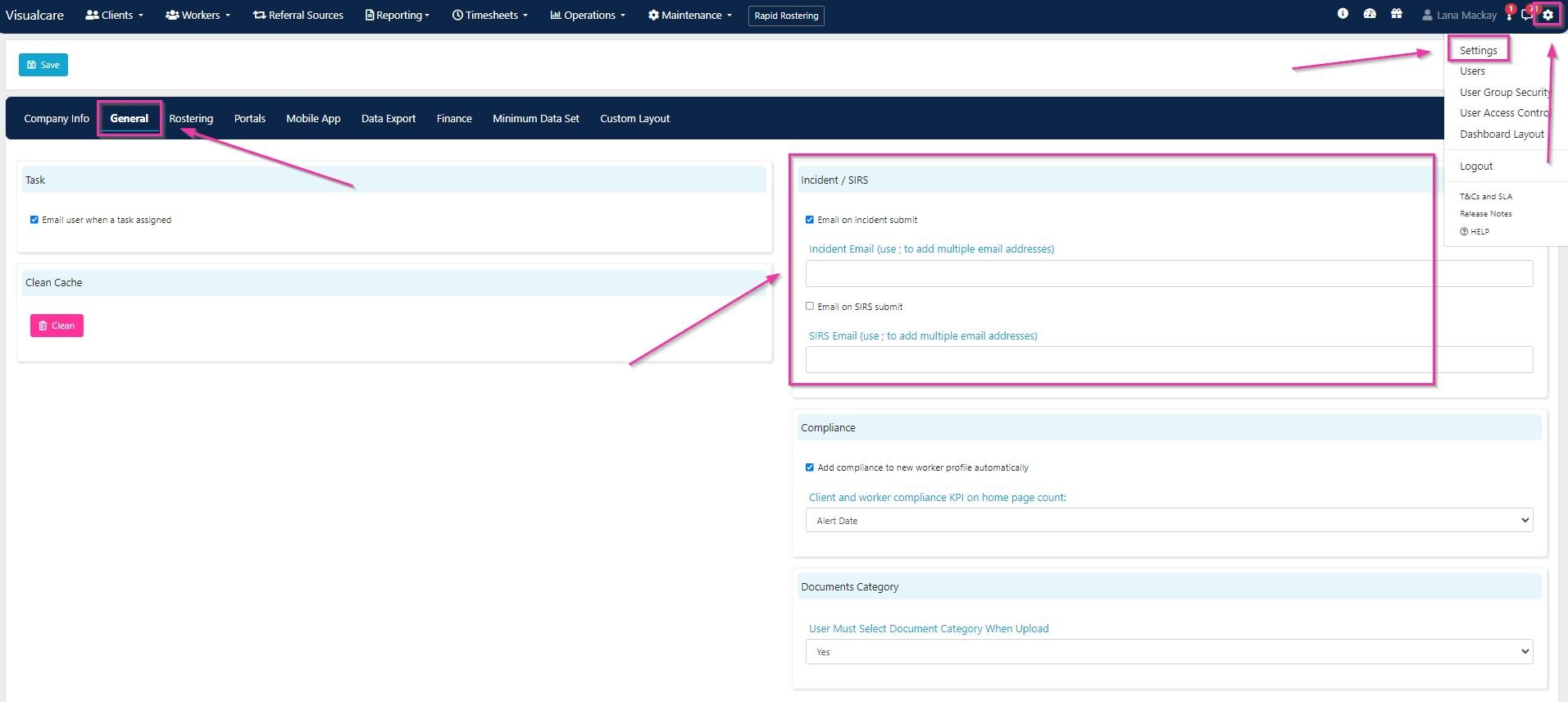
To notify specific employees by email when an incident report is submitted, add their email address under the incident section and tick **Email on incident submit**. Use a semicolon (;) to separate multiple email addresses.
### Incident and SIRS notifications
To notify specific employees by email when an incident report is submitted, add their email address under the incident section and tick **Email on incident submit**. Use a semicolon (;) to separate multiple email addresses.
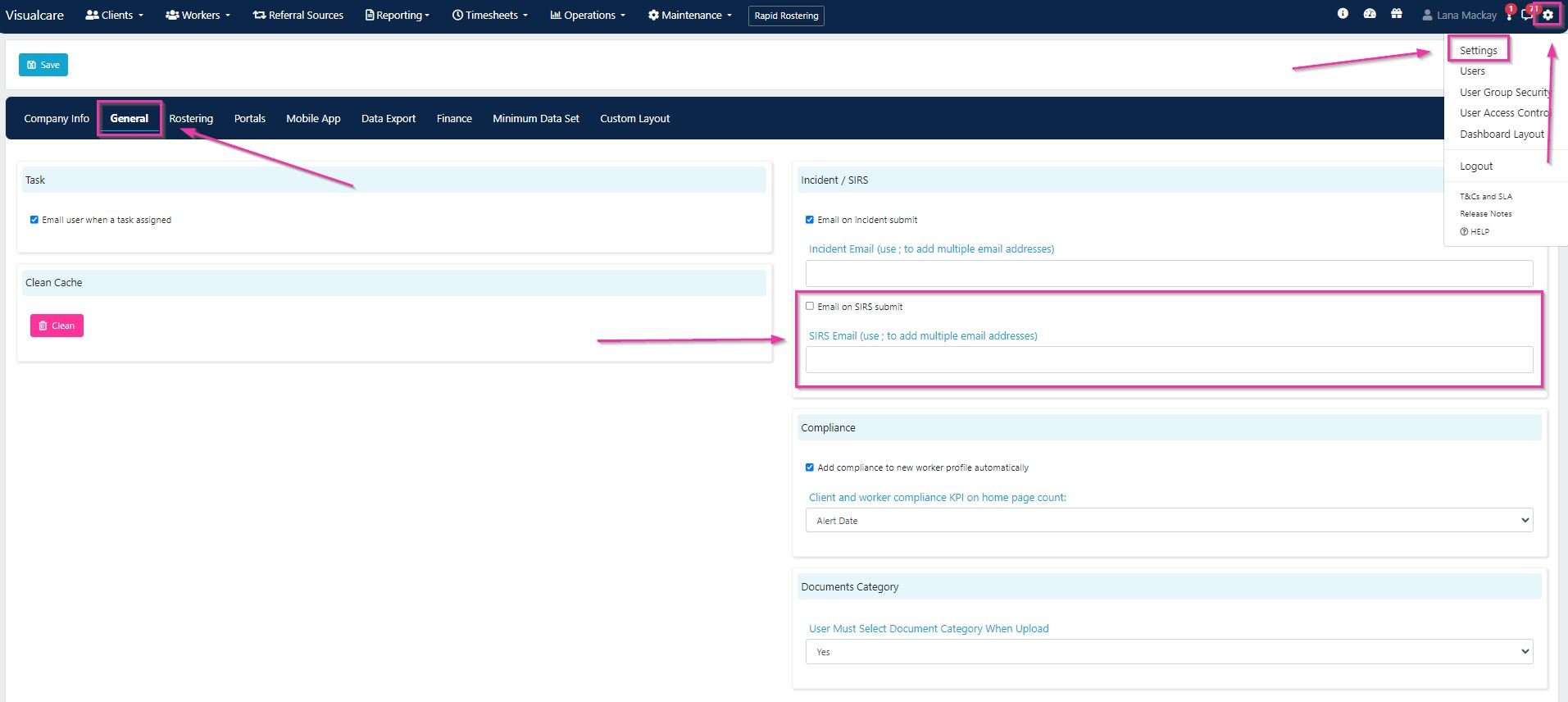
 For Serious Incident Response Scheme (SIRS) notifications, add the email address and tick **Email on SIRS submit**.
 ### Compliance settings
To automatically add compliance items to new worker profiles, tick **Add compliance to new worker profile automatically**.
### Compliance settings
To automatically add compliance items to new worker profiles, tick **Add compliance to new worker profile automatically**.
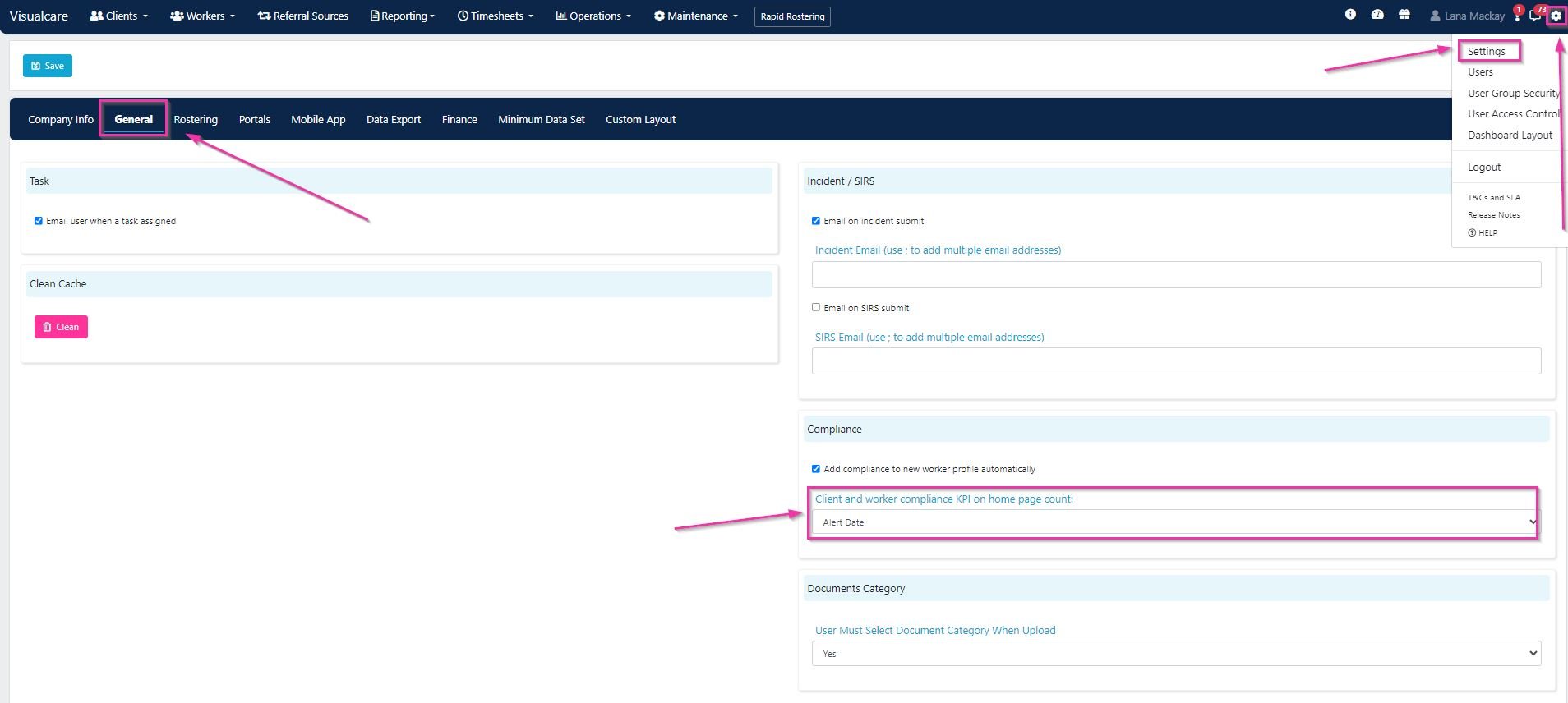
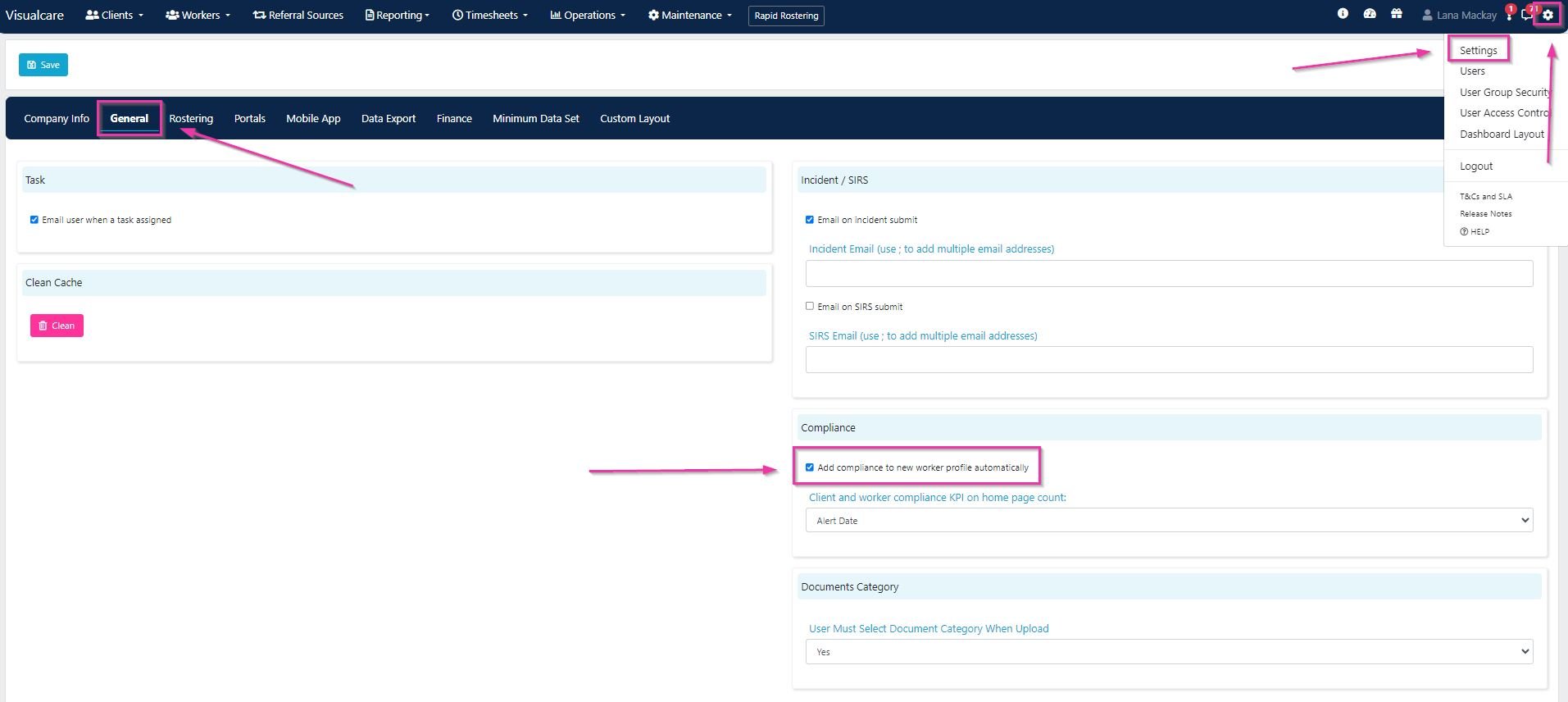 To set which date the worker compliance KPI tile on the VCore home page uses, select **Alert Date** or **Expiry Date** from the drop-down.
 ### Document category requirement
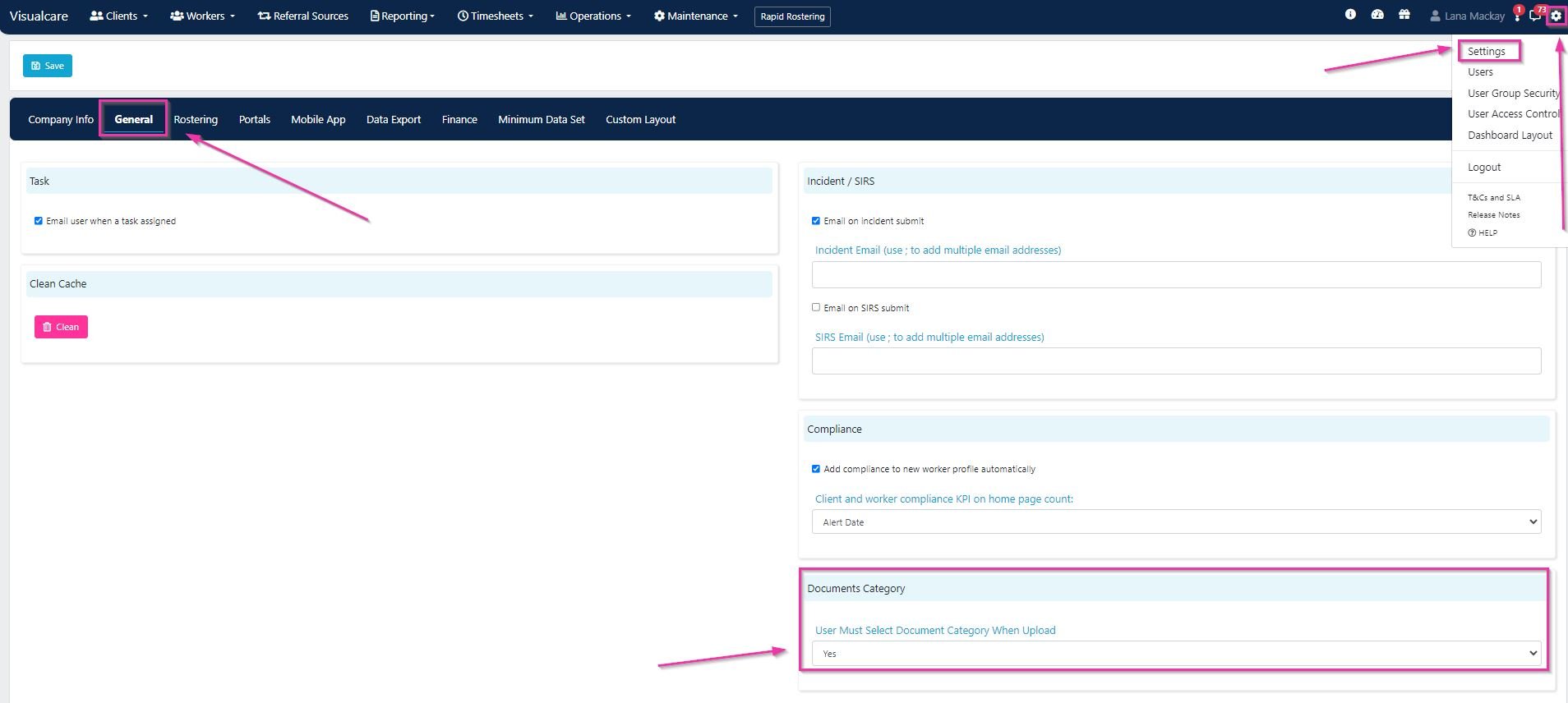
To require users to select a document category when uploading documents, set **User Must Select Document Category When Upload** to **Yes**.
### Document category requirement
To require users to select a document category when uploading documents, set **User Must Select Document Category When Upload** to **Yes**.
 ## Support at Home (SAH) transition
The Support at Home Program is the Australian Government's funding model that replaced Home Care Packages (HCP) from 1 November 2025. The Commonwealth Home Support Programme (CHSP) will transition in 2027.
### Key differences: HCP vs SAH
| Aspect | HCP | SAH |
| ------------------- | ------------------------------ | ------------------------------------------- |
| **Claiming** | Monthly bulk submission | Claim anytime (weekly, monthly) |
| **Invoicing** | Single invoice per participant | Split invoices (government and participant) |
| **Reconciliation** | Not required | Required from Services Australia |
| **Service codes** | HCP service codes | Government SAH service list |
| **Budgets** | Package levels | Quarterly budgets with classifications |
| **Care management** | Bundled in fees | Tracked separately (10% of ongoing budget) |
### SAH funding structure
| Funding type | Description |
| ------------------------- | ------------------------------------------------------------ |
| **Quarterly budget** | Government funding released every three months |
| **Classifications (1-8)** | Levels of ongoing funding (higher number means more support) |
| **Unspent funds** | Up to A\$1,000 or 10% rolls over each quarter |
| **HCP unspent funds** | Old HCP balances carried into SAH |
| **Supplements** | Extra funding for special needs |
| Pathway | Duration | Funding | Purpose |
| -------------------- | -------------- | --------- | -------------------------------------------- |
| **Restorative Care** | Up to 16 weeks | A\$6,000 | Help participants regain function |
| **End-of-Life** | 12 weeks | A\$25,000 | For people with three months or less to live |
| **AT-HM Scheme** | Varies | Varies | Equipment and home modifications |
| Code | Service type | Description |
| ------ | -------------------- | ---------------------------- |
| **AT** | Assistive Technology | Equipment and devices |
| **CM** | Care Management | Care coordination |
| **EL** | Everyday Living | Personal care, domestic help |
| **HM** | Home Modifications | Ramps, rails, modifications |
| **RC** | Respite Care | Short-term relief care |
| **ON** | Home Support Ongoing | Regular ongoing services |
### Care management
10% of the ongoing budget is automatically allocated to care management. The Care Management Pool (CMP) is quarantined for care coordination activities delivered by care partners.
## SAH migration dashboard
The SAH migration dashboard helps you transition from HCP to SAH services. Access it from **Operations** → **SAH Dashboard**.
## Support at Home (SAH) transition
The Support at Home Program is the Australian Government's funding model that replaced Home Care Packages (HCP) from 1 November 2025. The Commonwealth Home Support Programme (CHSP) will transition in 2027.
### Key differences: HCP vs SAH
| Aspect | HCP | SAH |
| ------------------- | ------------------------------ | ------------------------------------------- |
| **Claiming** | Monthly bulk submission | Claim anytime (weekly, monthly) |
| **Invoicing** | Single invoice per participant | Split invoices (government and participant) |
| **Reconciliation** | Not required | Required from Services Australia |
| **Service codes** | HCP service codes | Government SAH service list |
| **Budgets** | Package levels | Quarterly budgets with classifications |
| **Care management** | Bundled in fees | Tracked separately (10% of ongoing budget) |
### SAH funding structure
| Funding type | Description |
| ------------------------- | ------------------------------------------------------------ |
| **Quarterly budget** | Government funding released every three months |
| **Classifications (1-8)** | Levels of ongoing funding (higher number means more support) |
| **Unspent funds** | Up to A\$1,000 or 10% rolls over each quarter |
| **HCP unspent funds** | Old HCP balances carried into SAH |
| **Supplements** | Extra funding for special needs |
| Pathway | Duration | Funding | Purpose |
| -------------------- | -------------- | --------- | -------------------------------------------- |
| **Restorative Care** | Up to 16 weeks | A\$6,000 | Help participants regain function |
| **End-of-Life** | 12 weeks | A\$25,000 | For people with three months or less to live |
| **AT-HM Scheme** | Varies | Varies | Equipment and home modifications |
| Code | Service type | Description |
| ------ | -------------------- | ---------------------------- |
| **AT** | Assistive Technology | Equipment and devices |
| **CM** | Care Management | Care coordination |
| **EL** | Everyday Living | Personal care, domestic help |
| **HM** | Home Modifications | Ramps, rails, modifications |
| **RC** | Respite Care | Short-term relief care |
| **ON** | Home Support Ongoing | Regular ongoing services |
### Care management
10% of the ongoing budget is automatically allocated to care management. The Care Management Pool (CMP) is quarantined for care coordination activities delivered by care partners.
## SAH migration dashboard
The SAH migration dashboard helps you transition from HCP to SAH services. Access it from **Operations** → **SAH Dashboard**.
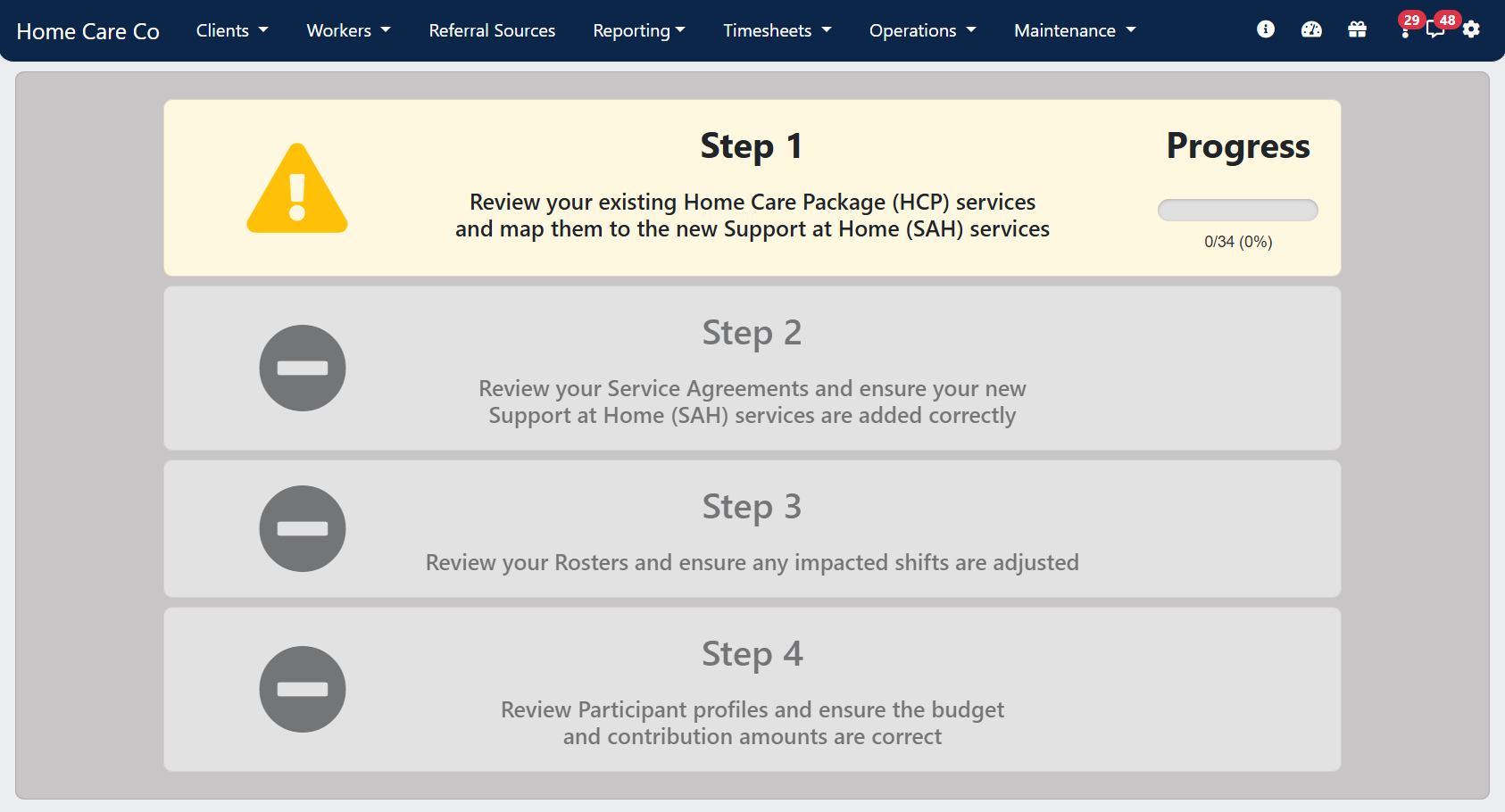 Step 1 (Services) is only available to users who have security permissions to access the **Maintenance** → **Services** page.
The dashboard has four steps:
### Step 1: Service migration
Map your existing HCP services to the new SAH services from the government-defined service list.
This page lists existing services with the **Home Care Package** service type. Work through the list and select the applicable SAH service for each HCP service.
Step 1 (Services) is only available to users who have security permissions to access the **Maintenance** → **Services** page.
The dashboard has four steps:
### Step 1: Service migration
Map your existing HCP services to the new SAH services from the government-defined service list.
This page lists existing services with the **Home Care Package** service type. Work through the list and select the applicable SAH service for each HCP service.
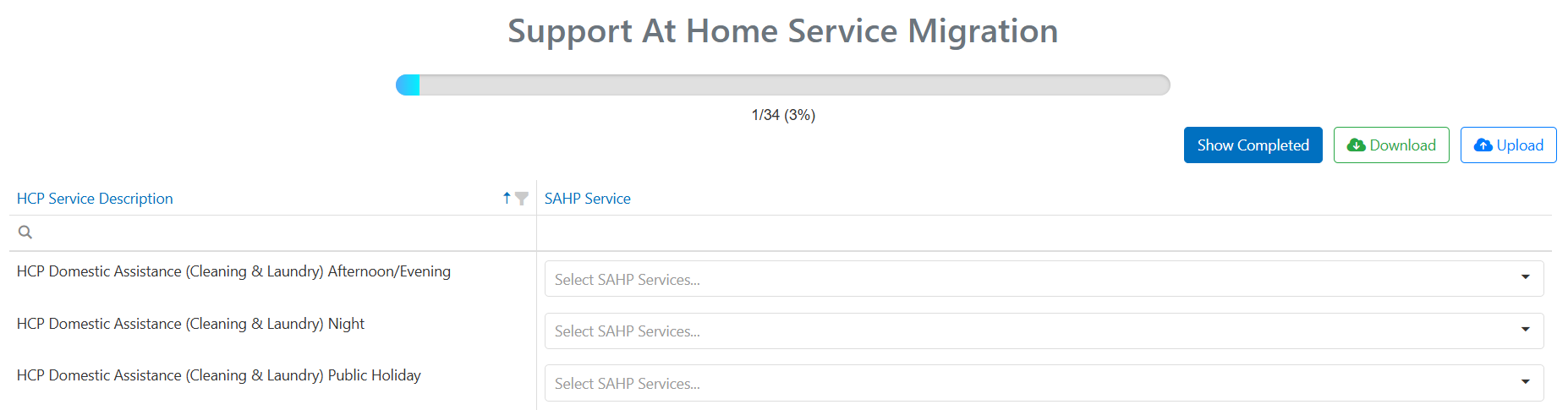 Services need to have "Home Care Package" as the service type to appear in the dashboard. If a service shows as blank or "HCP", update the service type under **Maintenance** → **Services** before using the mapping tool.
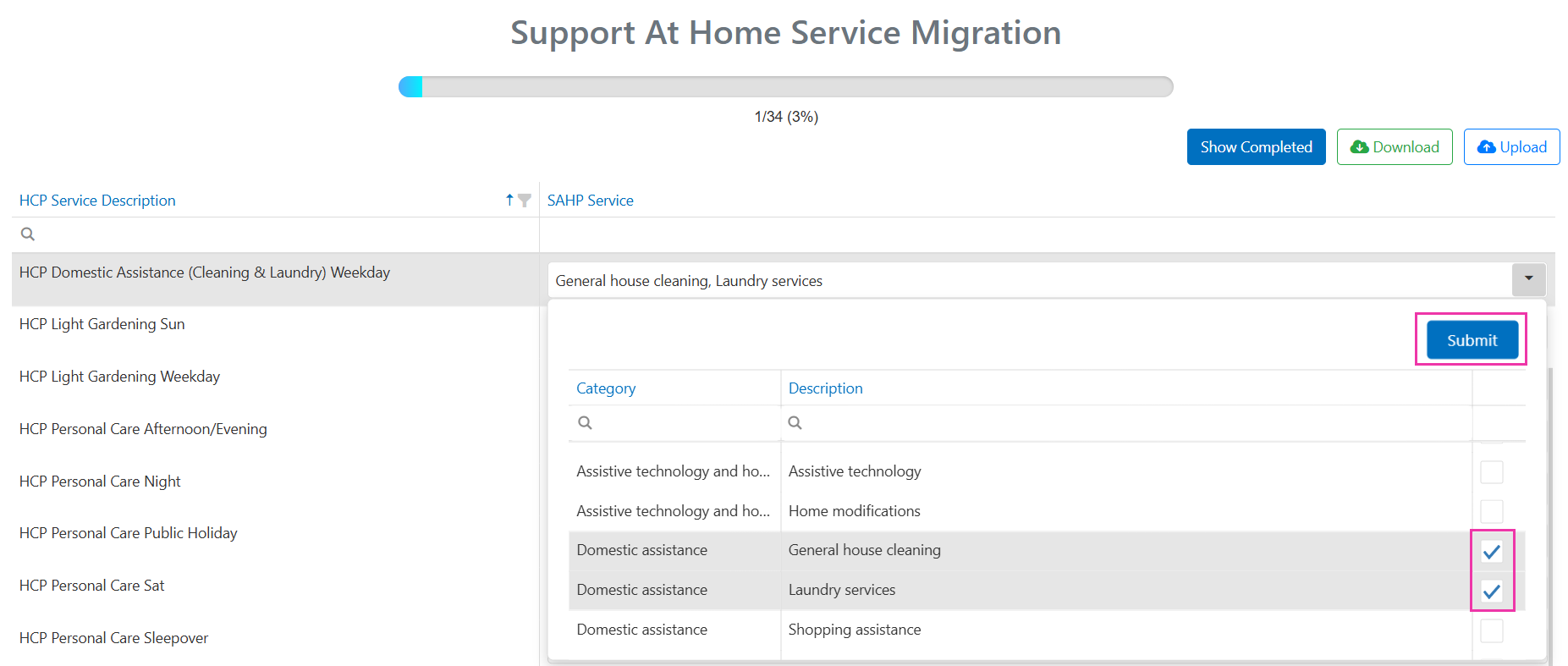
**Mapping one HCP service to multiple SAH services:**
If one HCP service needs to become multiple SAH services, tick all that apply and click **Submit**.
Services need to have "Home Care Package" as the service type to appear in the dashboard. If a service shows as blank or "HCP", update the service type under **Maintenance** → **Services** before using the mapping tool.
**Mapping one HCP service to multiple SAH services:**
If one HCP service needs to become multiple SAH services, tick all that apply and click **Submit**.
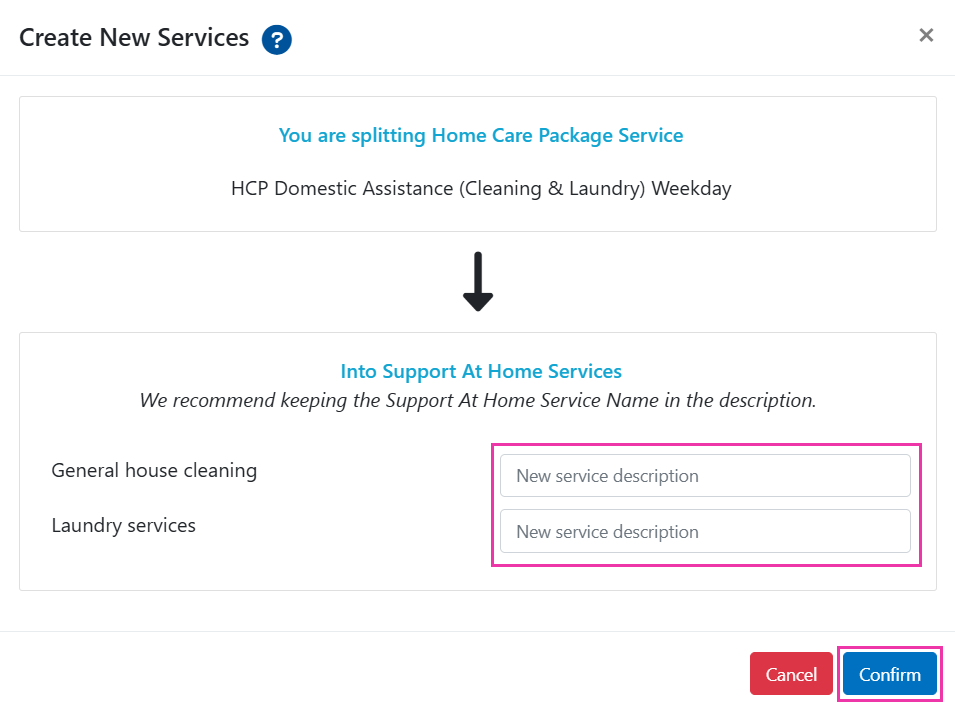
 The tool shows a **Create new services?** window where you can edit service descriptions before clicking **Confirm**.
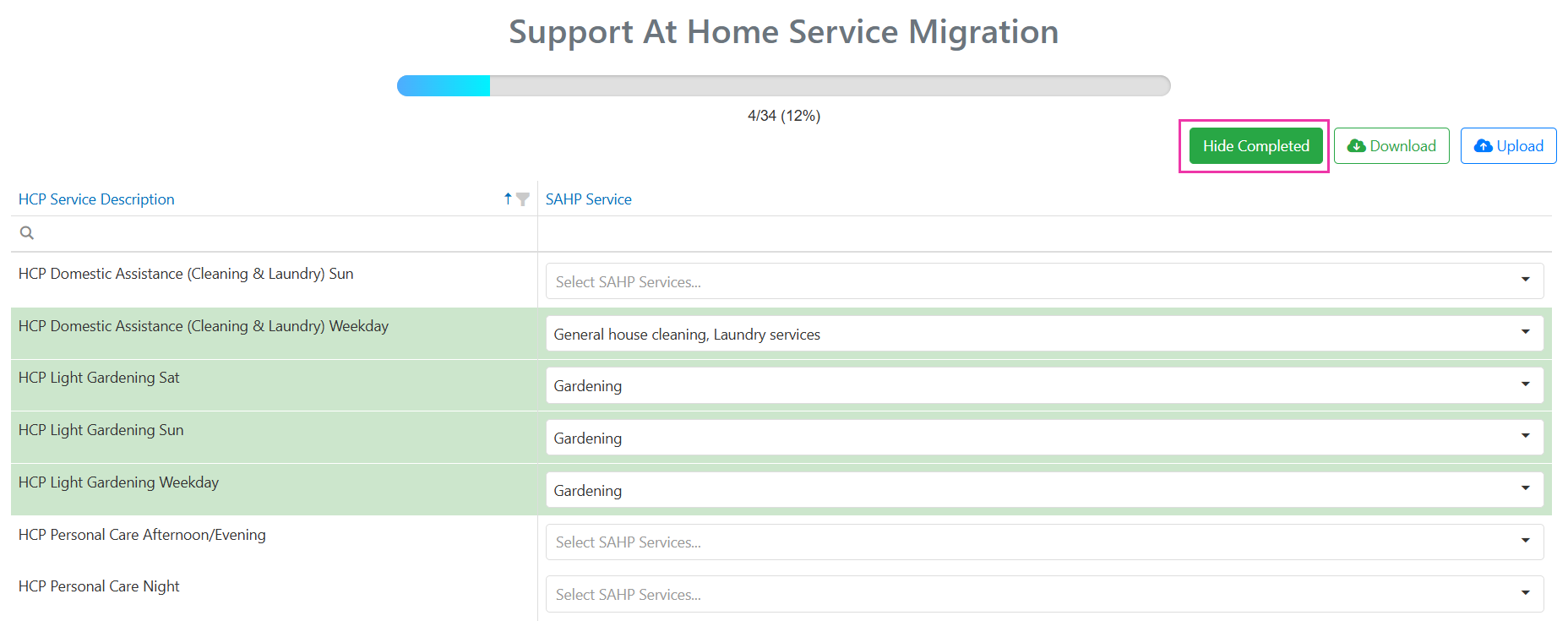
 Once all updates are made and confirmed, the completed HCP service is removed from the list. Use the **Show / Hide Completed** button to review or edit completed items.
 **Bulk mapping option:**
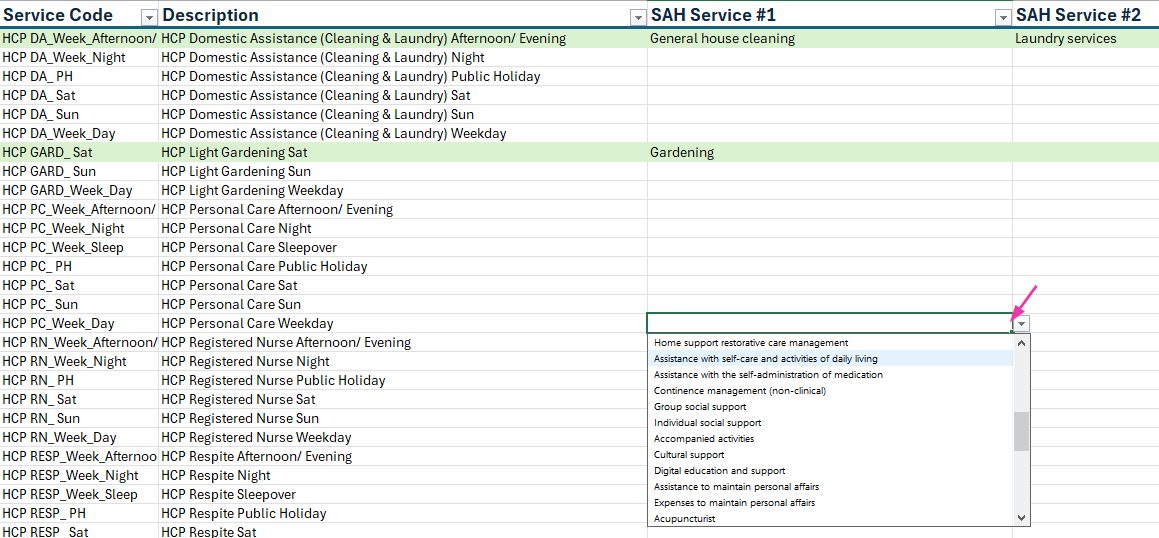
Use the **Download** and **Upload** buttons to map services in bulk via a spreadsheet. Mapped SAH services can be selected from the drop-down in the downloaded file. Completed items are highlighted in green.
**Bulk mapping option:**
Use the **Download** and **Upload** buttons to map services in bulk via a spreadsheet. Mapped SAH services can be selected from the drop-down in the downloaded file. Completed items are highlighted in green.
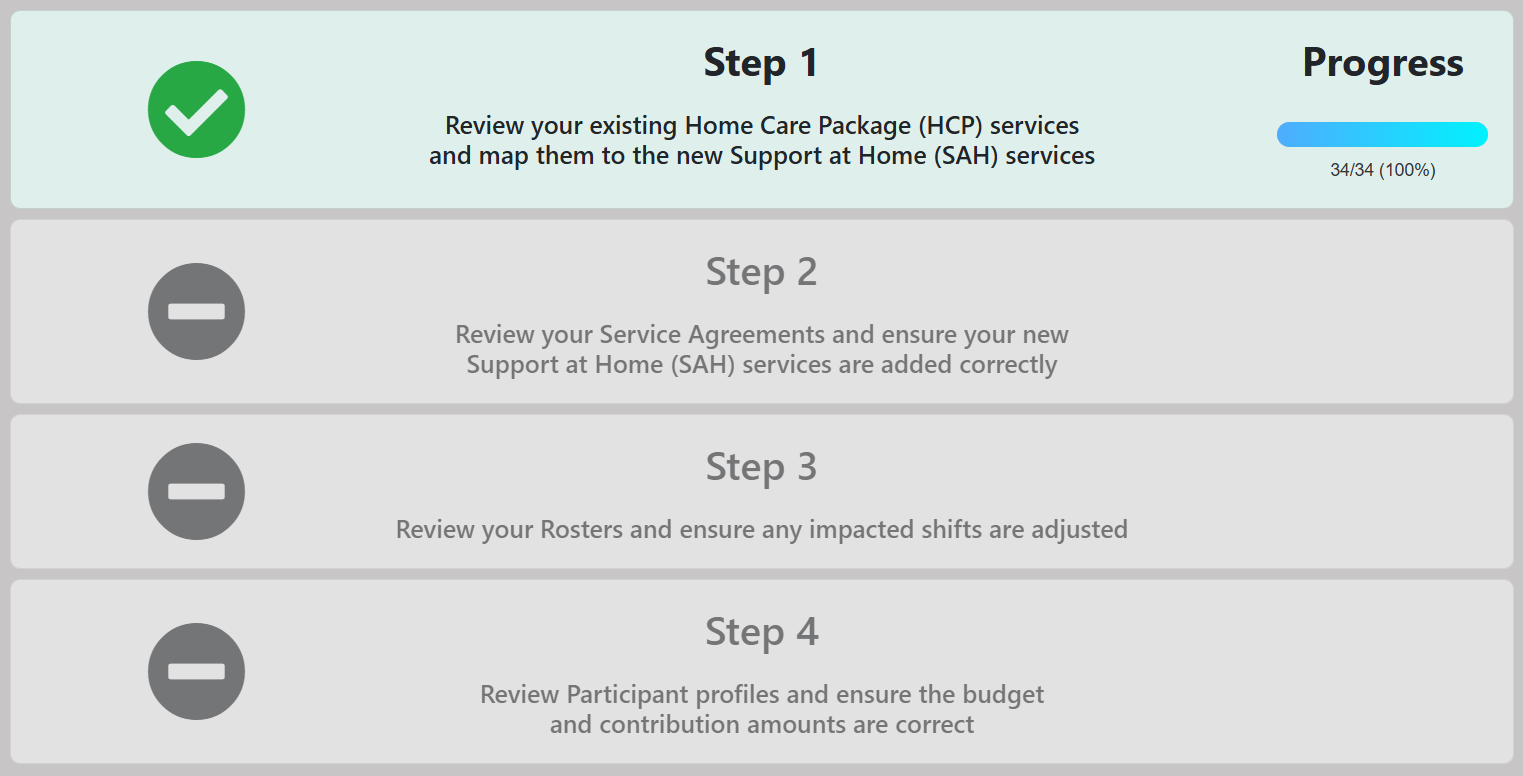
 Once all services are mapped, Step 1 shows a "complete" tick.
 After mapping, you can still update individual service details (charge rate, pay rate, accounting codes) under **Maintenance** → **Services**, or in bulk using the **Import CSV** function under **Maintenance** → **Services** → **All Services**. Note that if a mapped "parent" SAH service charge rate is updated, it overrides the "child" HCP original service rate.
### Step 2: Agreement migration
The tool clones HCP agreements and creates new SAH agreements:
* HCP agreements with the **Home Care Package** funding type are cloned and end-dated
* A new SAH agreement begins with the appropriate start date
* A care management service is created and added to the new agreement
Where one HCP service was mapped to multiple SAH services in Step 1, you can review and select which services to include in the new SAH agreement.
If a participant has been approved for Assistive Technology-Home Modifications, Short Term Restorative Care, or End of Life Care, these need to be set up as separate agreements. Where a care management service has been added, you may need to add additional information (charge rate, accounting code) under **Maintenance** → **Services**.
### Step 3: Roster migration
The roster step transfers all shifts from the transition date forward, updating services on shifts from the old HCP agreement to the new SAH agreement as mapped in the previous steps.
Where services need to be split for accurate SAH claiming (for example, splitting "Domestic Assistance" into separate house cleaning and laundry activities), additional roster customisation is needed manually. If existing HCP agreements end before the transition date, new SAH agreements and rosters need to be created separately.
### Step 4: Participant profiles
This step handles participant profile updates for the SAH transition.
### Transition considerations
* **Finalise HCP claims** - for transitioned HCP participants, SAH claiming cannot be processed until all HCP claims have been finalised
* **Provider registration** - ensure your organisation is registered for the SAH service categories you provide
* **Accounting software** - update your customer list, service items, and accounting codes in preparation for split invoicing
* **Service mapping** - take time to correctly map HCP services to SAH equivalents
* **Agreement review** - review new SAH agreements before activating
* **Staff training** - ensure care partners understand the new care management tracking requirements
* **Form updates** - if using JotForms with HCP information, contact Visualcare support to request updates for SAH
Participants receiving HCP on or before 12 September 2024 have protected contribution rules. All participants move to SAH claiming through Visualcare. There is no option to remain in the old HCP system, but transitional rules apply.
## CHSP migration
As of 1 July 2025, Stage 1 of the Support at Home reform is in effect for all CHSP providers. A new CHSP service list has replaced the old services, and DEX rejects any activity reported using outdated codes for services from 1 July.
### What changed
All CHSP services now use new service types and program activities. CHSP services delivered from 1 July 2025 need to be mapped to the new codes before July data is lodged in August.
Legacy codes that can no longer be used:
* ATSI Health Worker (ID 29)
* Hydrotherapy (ID 105)
* Nursing (ID 58)
* Ongoing Allied Health and Therapy Services (ID 34)
* Other Allied Health and Therapy Services (ID 35)
* Restorative Care Services (ID 39)
* Other Goods and Equipment (ID 48)
All other CHSP codes are mapped to their updated equivalents upon migration.
### Running the CHSP migration wizard
Request approval for new program activities in the DEX portal before running the migration in Visualcare.
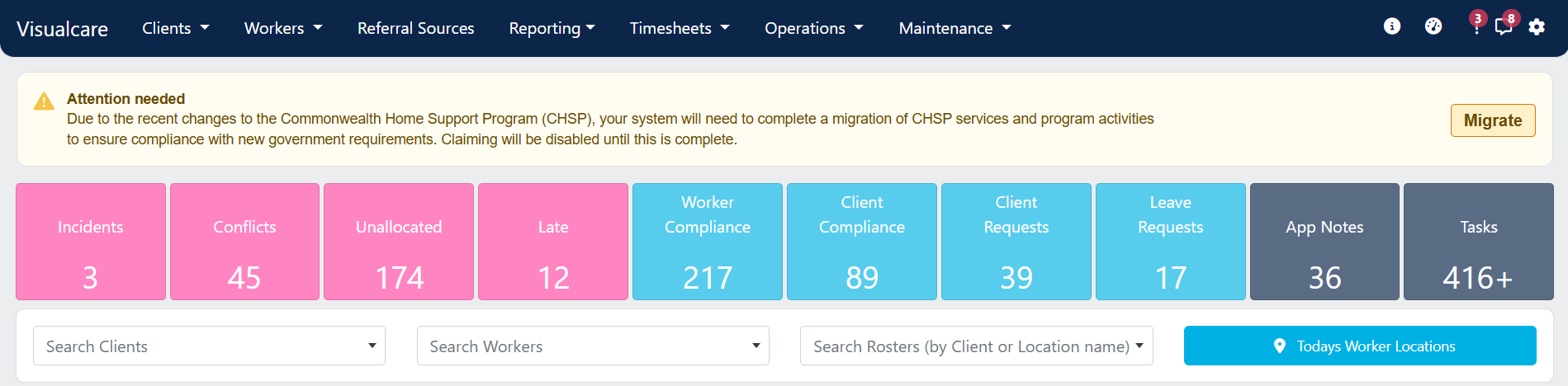
Click the **Migrate** button from the banner at the top of your screen in Visualcare.
After mapping, you can still update individual service details (charge rate, pay rate, accounting codes) under **Maintenance** → **Services**, or in bulk using the **Import CSV** function under **Maintenance** → **Services** → **All Services**. Note that if a mapped "parent" SAH service charge rate is updated, it overrides the "child" HCP original service rate.
### Step 2: Agreement migration
The tool clones HCP agreements and creates new SAH agreements:
* HCP agreements with the **Home Care Package** funding type are cloned and end-dated
* A new SAH agreement begins with the appropriate start date
* A care management service is created and added to the new agreement
Where one HCP service was mapped to multiple SAH services in Step 1, you can review and select which services to include in the new SAH agreement.
If a participant has been approved for Assistive Technology-Home Modifications, Short Term Restorative Care, or End of Life Care, these need to be set up as separate agreements. Where a care management service has been added, you may need to add additional information (charge rate, accounting code) under **Maintenance** → **Services**.
### Step 3: Roster migration
The roster step transfers all shifts from the transition date forward, updating services on shifts from the old HCP agreement to the new SAH agreement as mapped in the previous steps.
Where services need to be split for accurate SAH claiming (for example, splitting "Domestic Assistance" into separate house cleaning and laundry activities), additional roster customisation is needed manually. If existing HCP agreements end before the transition date, new SAH agreements and rosters need to be created separately.
### Step 4: Participant profiles
This step handles participant profile updates for the SAH transition.
### Transition considerations
* **Finalise HCP claims** - for transitioned HCP participants, SAH claiming cannot be processed until all HCP claims have been finalised
* **Provider registration** - ensure your organisation is registered for the SAH service categories you provide
* **Accounting software** - update your customer list, service items, and accounting codes in preparation for split invoicing
* **Service mapping** - take time to correctly map HCP services to SAH equivalents
* **Agreement review** - review new SAH agreements before activating
* **Staff training** - ensure care partners understand the new care management tracking requirements
* **Form updates** - if using JotForms with HCP information, contact Visualcare support to request updates for SAH
Participants receiving HCP on or before 12 September 2024 have protected contribution rules. All participants move to SAH claiming through Visualcare. There is no option to remain in the old HCP system, but transitional rules apply.
## CHSP migration
As of 1 July 2025, Stage 1 of the Support at Home reform is in effect for all CHSP providers. A new CHSP service list has replaced the old services, and DEX rejects any activity reported using outdated codes for services from 1 July.
### What changed
All CHSP services now use new service types and program activities. CHSP services delivered from 1 July 2025 need to be mapped to the new codes before July data is lodged in August.
Legacy codes that can no longer be used:
* ATSI Health Worker (ID 29)
* Hydrotherapy (ID 105)
* Nursing (ID 58)
* Ongoing Allied Health and Therapy Services (ID 34)
* Other Allied Health and Therapy Services (ID 35)
* Restorative Care Services (ID 39)
* Other Goods and Equipment (ID 48)
All other CHSP codes are mapped to their updated equivalents upon migration.
### Running the CHSP migration wizard
Request approval for new program activities in the DEX portal before running the migration in Visualcare.
Click the **Migrate** button from the banner at the top of your screen in Visualcare.
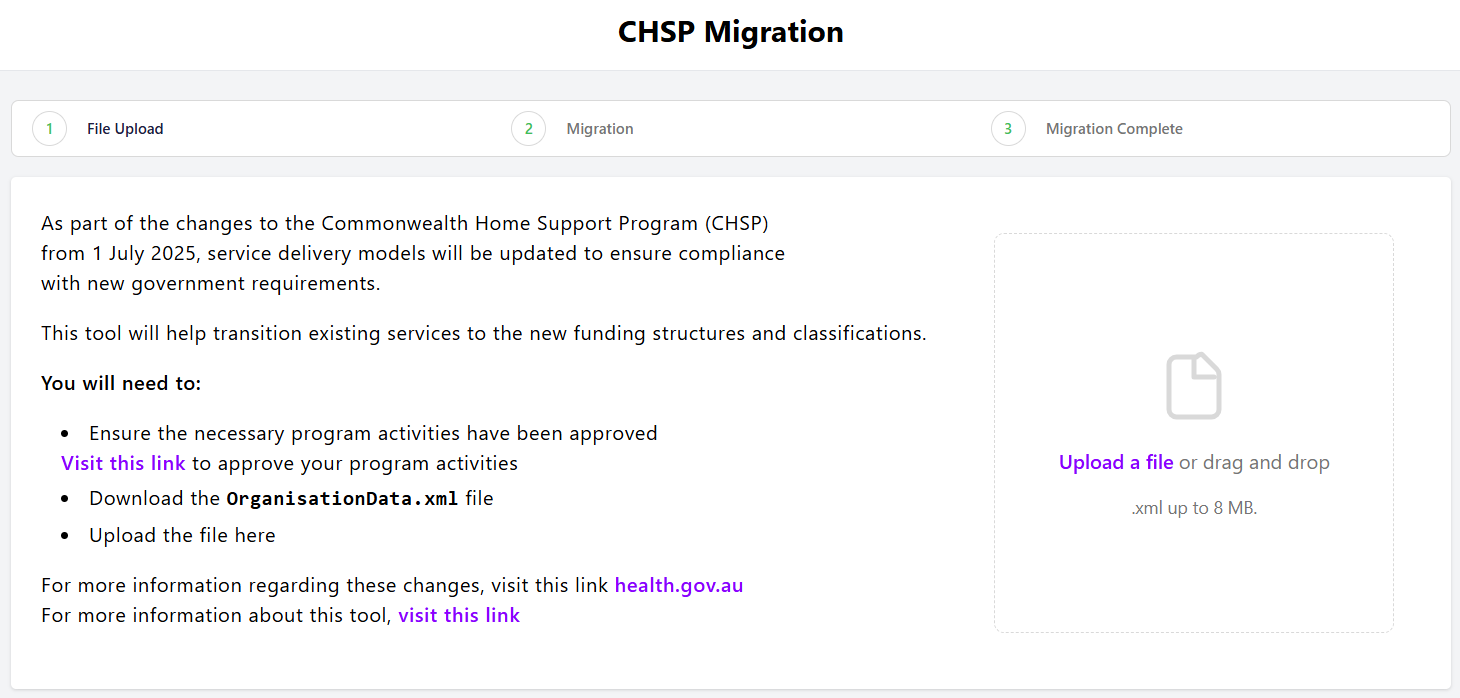
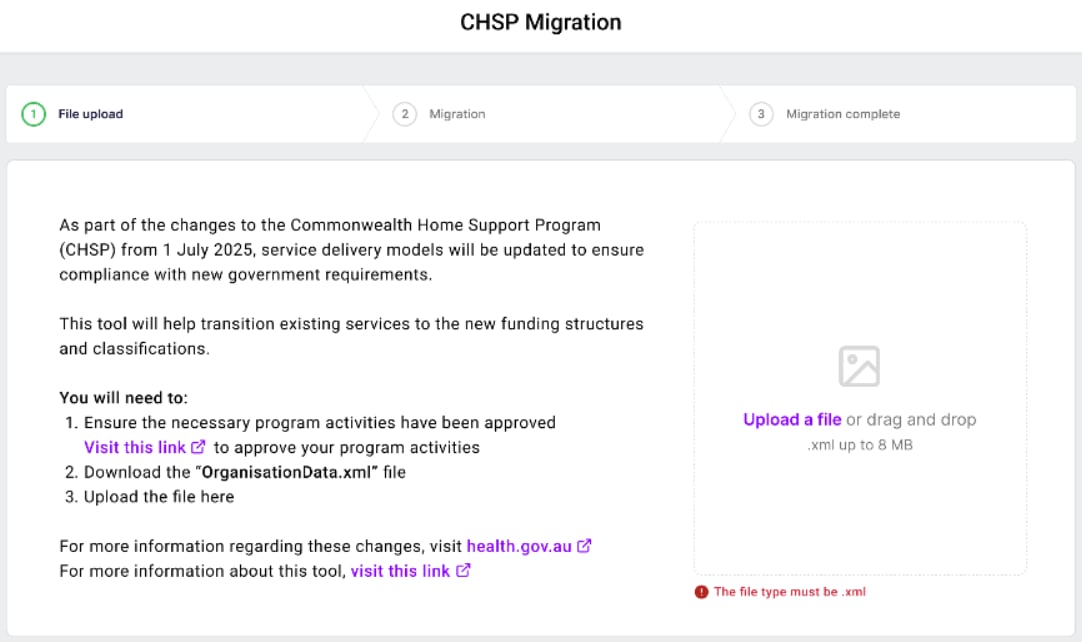
 Drag and drop your .XML file, or click **Upload a file** to select it. The wizard checks the file before upload and flags any required actions.
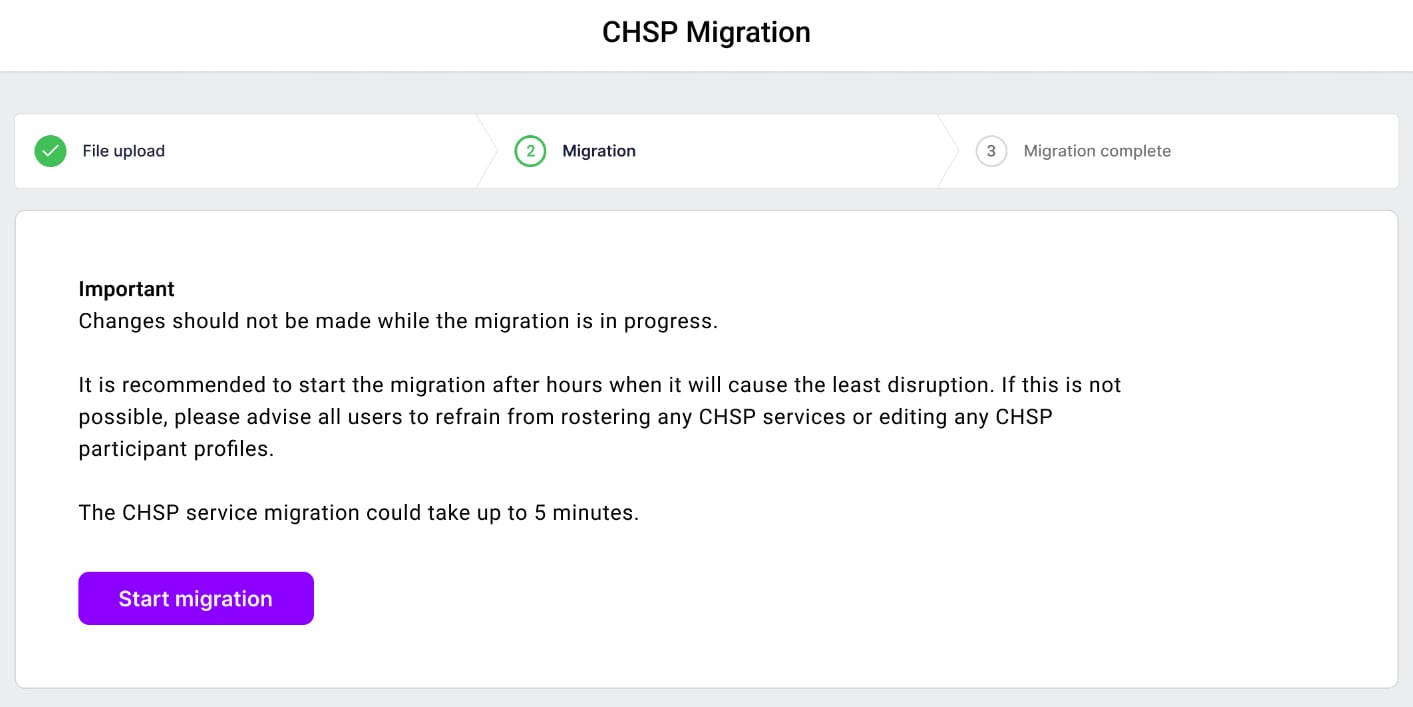
 Click **Start Migration**. The tool matches old service types to the new CHSP services, updates DEX Case and Activity fields on agreements, rosters, and timesheets, and creates new DEX cases for approved program activities.
 ### CHSP migration troubleshooting
**When this occurs:**
* The incorrect file format is uploaded (for example, .csv or .pdf)
* A file with incorrect structure or content is uploaded
**What to do:**
* Download the **OrganisationData.xml** file from the DEX portal and try uploading again
### CHSP migration troubleshooting
**When this occurs:**
* The incorrect file format is uploaded (for example, .csv or .pdf)
* A file with incorrect structure or content is uploaded
**What to do:**
* Download the **OrganisationData.xml** file from the DEX portal and try uploading again
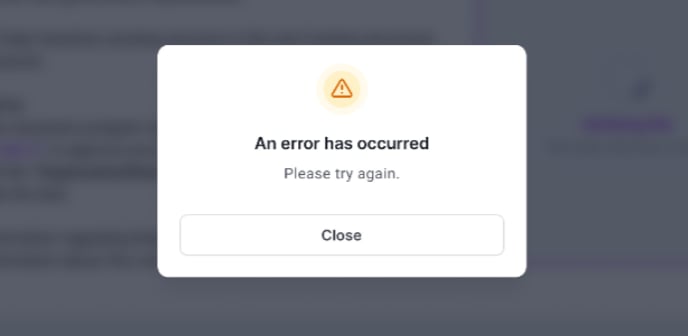
 **When this occurs:**
* A backend error occurs due to system processing issues (rare)
**What to do:**
* Try the upload again
* If the error persists, contact [support@visualcare.com.au](mailto:support@visualcare.com.au)
**When this occurs:**
* A backend error occurs due to system processing issues (rare)
**What to do:**
* Try the upload again
* If the error persists, contact [support@visualcare.com.au](mailto:support@visualcare.com.au)
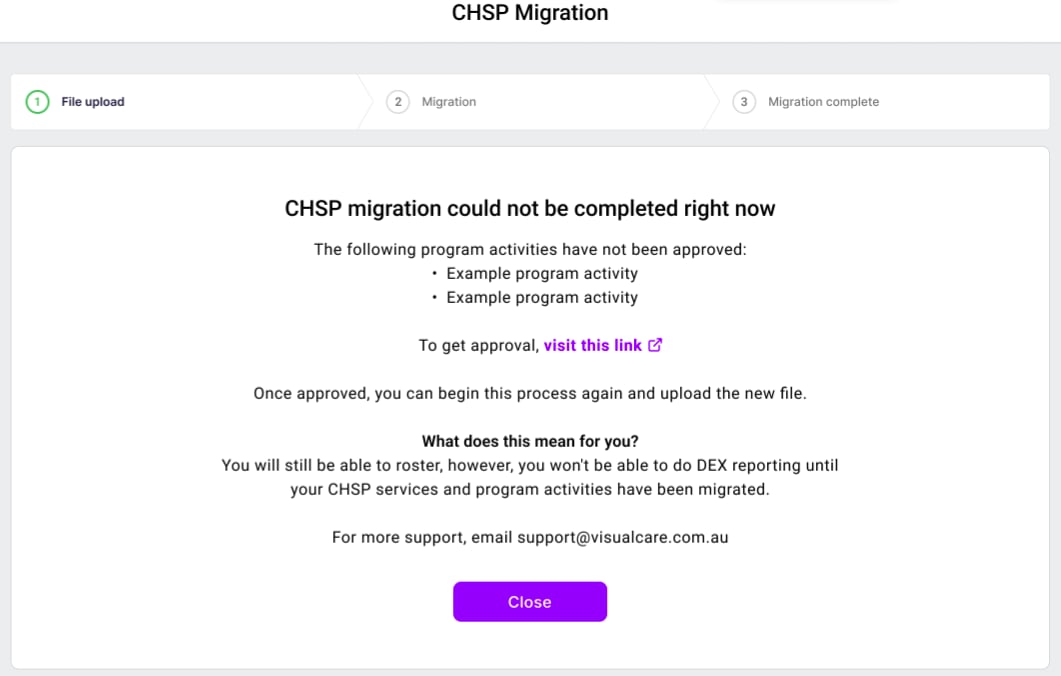
 **When this occurs:**
* The provider has previously delivered services that have not been approved in the current OrganisationData file
* These activities cannot be mapped and prevent the migration from completing
**What to do:**
* Review the instructions on the screen
* Use the DEX portal to request approval for the missing activities
* Once approved, re-upload the updated OrganisationData file and re-run the migration
**When this occurs:**
* The provider has previously delivered services that have not been approved in the current OrganisationData file
* These activities cannot be mapped and prevent the migration from completing
**What to do:**
* Review the instructions on the screen
* Use the DEX portal to request approval for the missing activities
* Once approved, re-upload the updated OrganisationData file and re-run the migration
 ## SAH glossary
| Term | Definition |
| ------------------------------------ | -------------------------------------------------------------- |
| **Care Recipient ID** | Unique identifier for SAH participants |
| **Care Partner** | Staff member delivering care management activities |
| **Care Management Account** | Account where 10% of quarterly budget is pooled |
| **Classification** | Funding level (1-8 for ongoing, plus short-term) |
| **Grandfathered HCP Care Recipient** | Person receiving HCP on or before 12 September 2024 |
| **Monthly Statement** | Statement showing budget, services, contributions, and balance |
| **NAPS ID** | National Approved Provider System identifier |
| **Quarterly Budget** | Government funding released every three months |
| **Service Agreement** | Legal agreement between provider and participant |
| **Transitioned HCP Care Recipient** | Person who moved from HCP to SAH |
## Running into issues?
See [General troubleshooting](/troubleshooting/general) for common errors and fixes.
## Related articles
Set up and manage services, charge rates, and pay rates
Import records in bulk using CSV files
Manage areas, payers, and other configuration lists
## SAH glossary
| Term | Definition |
| ------------------------------------ | -------------------------------------------------------------- |
| **Care Recipient ID** | Unique identifier for SAH participants |
| **Care Partner** | Staff member delivering care management activities |
| **Care Management Account** | Account where 10% of quarterly budget is pooled |
| **Classification** | Funding level (1-8 for ongoing, plus short-term) |
| **Grandfathered HCP Care Recipient** | Person receiving HCP on or before 12 September 2024 |
| **Monthly Statement** | Statement showing budget, services, contributions, and balance |
| **NAPS ID** | National Approved Provider System identifier |
| **Quarterly Budget** | Government funding released every three months |
| **Service Agreement** | Legal agreement between provider and participant |
| **Transitioned HCP Care Recipient** | Person who moved from HCP to SAH |
## Running into issues?
See [General troubleshooting](/troubleshooting/general) for common errors and fixes.
## Related articles
Set up and manage services, charge rates, and pay rates
Import records in bulk using CSV files
Manage areas, payers, and other configuration lists