> ## Documentation Index
> Fetch the complete documentation index at: https://help.visualcare.com.au/llms.txt
> Use this file to discover all available pages before exploring further.
# Creating tasks
> Step-by-step guide to creating and assigning tasks in Visualcare
Tasks in Visualcare enable collaboration and coordination between office users. They help keep track of actions, set up reminders, delegate work to others, and assign priorities. This guide covers the different ways to create a task.
## How tasks work
Tasks are an extension of the notes functionality. Any note becomes a task when you assign it to an office user using the **Assign To (Create a task)** drop-down.
Tasks can only be assigned to office users, not workers.
## Instructions
Navigate to the relevant client or worker profile and open the notes section, or create a new note.
Select a user from the **Assign To (Create a task)** drop-down list. This converts the note into a task and assigns it to the selected user.
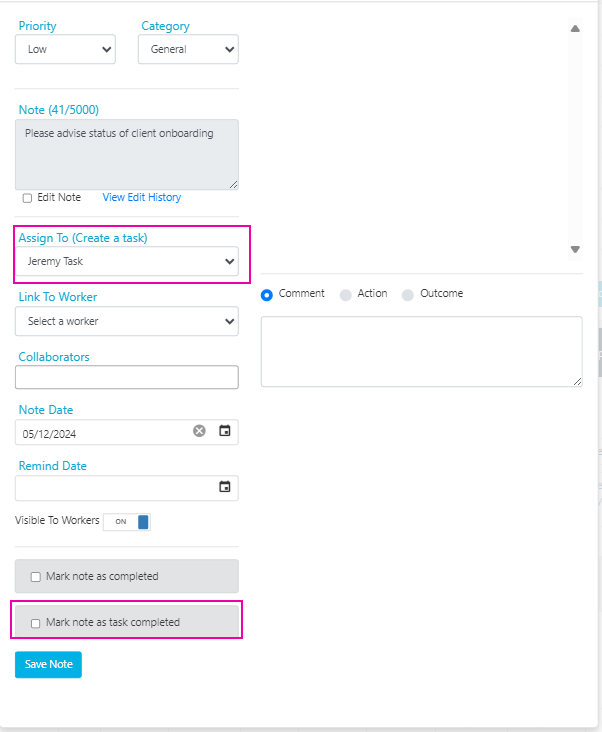 Optionally set the **Priority** (Low, Medium, High, or Urgent), **Remind Date**, and any other relevant details.
Click **Save Changes**. The assigned user receives an automated email notification if this option is enabled in **Settings** → **General** → **Tasks**.
To mark a task as complete, tick **Mark note as task completed** in the note window, or tick **This task is completed** when editing the task from the Tasks list.
## Other ways tasks are created
Tasks aren't only created manually. They can also be generated automatically:
| Source | How it works |
| ----------------------- | --------------------------------------------------------------------------------------------------------------------------------------------------------- |
| **Workflows** | When a task action is selected in a workflow under **Operations** → **Workflows**, tasks are created automatically based on the workflow trigger |
| **Vworker shift notes** | In **Settings** → **Mobile App** → **Vworker** → **Shift**, travel notes or completion notes entered from the Vworker app can automatically create a task |
## Running into issues?
See [General troubleshooting](/troubleshooting/general) for common errors and fixes.
## Related articles
Find, filter, and manage your tasks
Edit multiple client or worker records at once
Optionally set the **Priority** (Low, Medium, High, or Urgent), **Remind Date**, and any other relevant details.
Click **Save Changes**. The assigned user receives an automated email notification if this option is enabled in **Settings** → **General** → **Tasks**.
To mark a task as complete, tick **Mark note as task completed** in the note window, or tick **This task is completed** when editing the task from the Tasks list.
## Other ways tasks are created
Tasks aren't only created manually. They can also be generated automatically:
| Source | How it works |
| ----------------------- | --------------------------------------------------------------------------------------------------------------------------------------------------------- |
| **Workflows** | When a task action is selected in a workflow under **Operations** → **Workflows**, tasks are created automatically based on the workflow trigger |
| **Vworker shift notes** | In **Settings** → **Mobile App** → **Vworker** → **Shift**, travel notes or completion notes entered from the Vworker app can automatically create a task |
## Running into issues?
See [General troubleshooting](/troubleshooting/general) for common errors and fixes.
## Related articles
Find, filter, and manage your tasks
Edit multiple client or worker records at once