> ## Documentation Index
> Fetch the complete documentation index at: https://help.visualcare.com.au/llms.txt
> Use this file to discover all available pages before exploring further.
# Incident tile on home page
> How the incidents KPI tile and notification indicator work on the VCore home page
The VCore home page includes an **Incidents** KPI tile that shows all unread incidents at a glance. This helps office staff identify and respond to new incidents quickly without navigating to individual client profiles.
## How it works
When a support worker submits an incident form through the Vworker mobile app, two things happen:
1. The incident is saved to the relevant client and worker profiles
2. A pop-up notification is generated for office staff in VCore
The notification appears as a red number above the exclamation mark icon in the top-right corner of the VCore header.
 ## Accessing incident details
To view more information about an incident, click either:
* The **Incidents** KPI tile on the home page
* The exclamation mark notification icon in the header
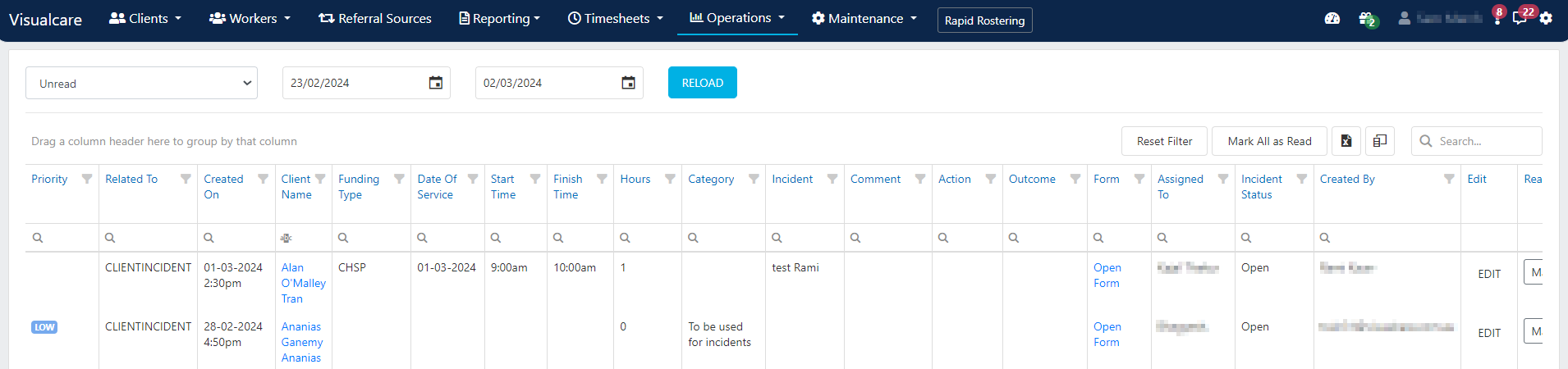
Both options take you to the incident details where you can review and investigate the submission.
## Accessing incident details
To view more information about an incident, click either:
* The **Incidents** KPI tile on the home page
* The exclamation mark notification icon in the header
Both options take you to the incident details where you can review and investigate the submission.
 Check the Incidents KPI tile at the start of each day to make sure no new incidents have gone unreviewed.
## Running into issues?
See [Incidents troubleshooting](/troubleshooting/general) for common errors and fixes.
## Related articles
How incidents are created and where to find them
Review and update incident details after submission
Create and manage Serious Incident Response Scheme records
Check the Incidents KPI tile at the start of each day to make sure no new incidents have gone unreviewed.
## Running into issues?
See [Incidents troubleshooting](/troubleshooting/general) for common errors and fixes.
## Related articles
How incidents are created and where to find them
Review and update incident details after submission
Create and manage Serious Incident Response Scheme records